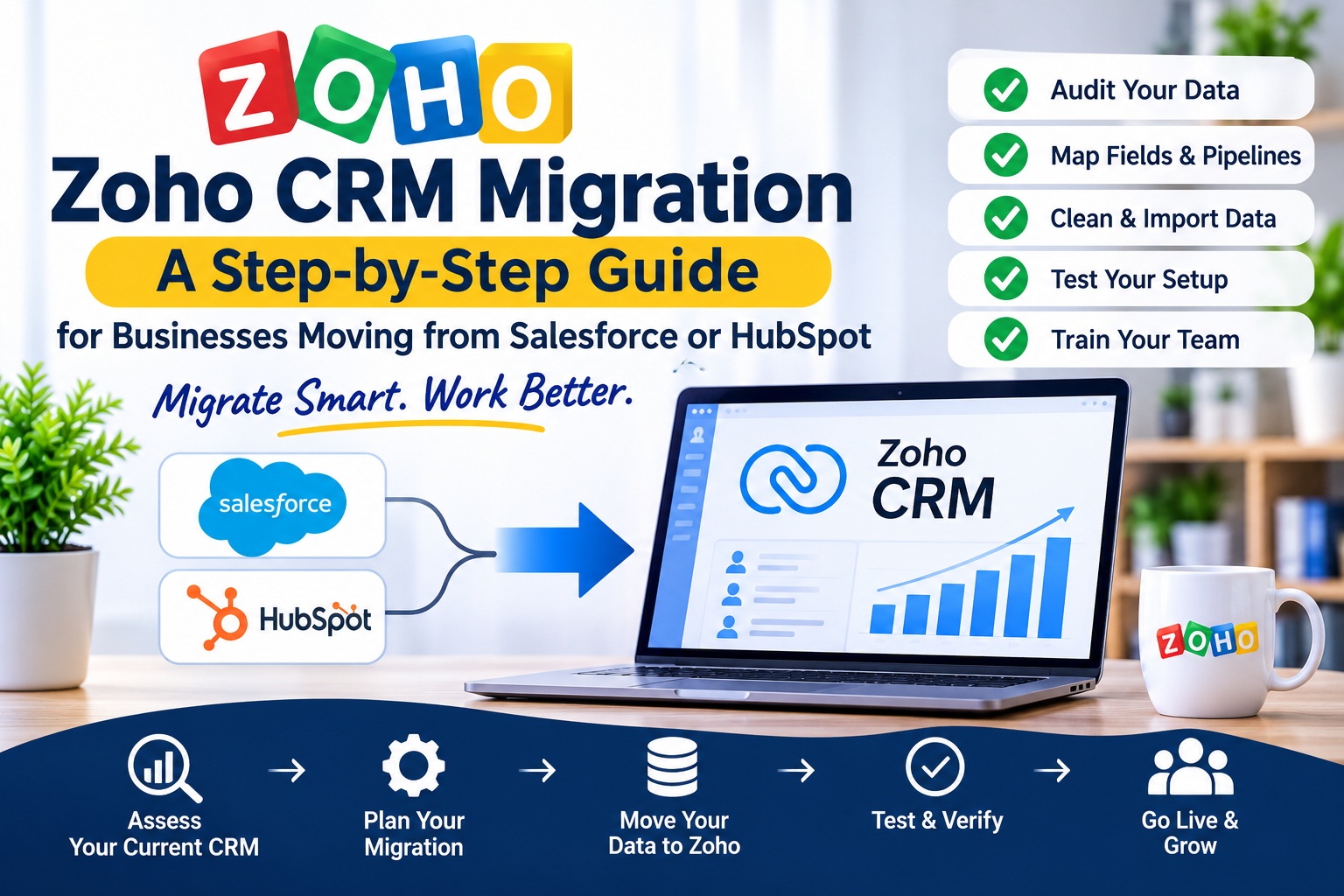
You are paying too much for Salesforce or HubSpot. Or your team is not using half the features. Or your contract is coming up for renewal and you are asking the obvious question: could Zoho do the same work for less?
For many US businesses, the answer is yes. The risk is not Zoho. The risk is the move itself.
A Zoho CRM migration is the process of moving your contacts, deals, history, and workflows from your old CRM into Zoho CRM, without losing data, breaking your sales process, or leaving your team without a system for weeks.
This guide shows you how to do it safely, step by step, whether you are moving from Salesforce or HubSpot. It also shows you when to hire a Zoho CRM migration consultant, and what to ask before you do.
Why Businesses Migrate to Zoho CRM
Businesses usually migrate to Zoho CRM for one of these reasons:
Cost. Salesforce and HubSpot can become expensive as your team and your data grow. Zoho CRM offers similar core sales features at a lower per user cost, and its wider app suite means you can add accounting, support, and marketing without buying a separate platform for each one.
Simplicity. Some teams find Salesforce too complex for how they actually sell. Zoho CRM is easier to set up, easier to train on, and easier to change when your process changes.
One platform. If you already use Zoho Books, Zoho Desk, or Zoho Campaigns, or you plan to, having your CRM in the same platform removes integrations, duplicate data, and extra logins.
Control. A migration is also a chance to clean up. Many businesses use the move to remove dead leads, fix duplicate records, and rebuild a pipeline that matches how they sell now, not how they sold three years ago.
A migration is not a reason to change your sales process for the sake of it. The goal is a cleaner system that does the same work better, at a cost your business can sustain.
The Biggest Risks in a Zoho CRM Migration
Most Zoho CRM migration problems are not technical. They are planning problems.
Data loss. Records, notes, attachments, and email history that were not mapped properly, or were never exported, do not appear in Zoho. You only notice when a salesperson cannot find a customer.
Broken relationships. A contact without its company, a deal without its history, or a quote without its products is not useful data. It is a mess your team has to rebuild by hand.
Wrong field mapping. Your old CRM calls it “Lead Source”. Zoho calls it something else. Your old pipeline has six stages. Zoho has a different default. If no one maps these properly, your reports and your pipeline stop making sense.
No downtime plan. Your team still needs to sell while you migrate. If the cutover is not planned, you get days where no one knows which system is correct.
No one tests it. A migration that was never tested with real data will fail in real use. Testing is not optional, even for a small business.
A Zoho CRM migration consultant should talk about these risks first, not just about the import tool.
Zoho CRM Migration: The Step-by-Step Process
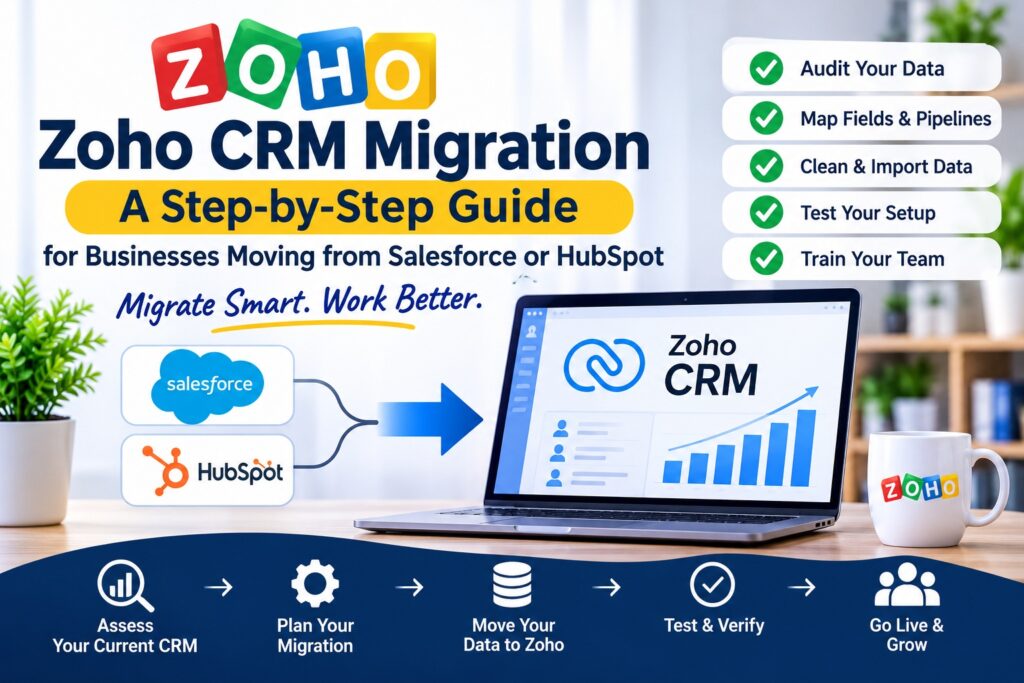
Here is the process ZillTech follows for a Zoho CRM migration. Use it as a checklist, whether you do it yourself or hire a partner.
Step 1. Audit what you actually have
Before you export anything, find out what is in your old CRM.
- How many contacts, companies, deals, and leads do you have?
- How many are active, and how many are dead, duplicate, or incomplete?
- What custom fields, objects, and workflows are you using?
- What attachments, notes, and email history do you need to keep?
- What integrations are connected to your old CRM?
This audit decides the scope of the migration. Most businesses are surprised by how much old data they have, and how little of it they still need. That is good news. A smaller, cleaner migration is faster and safer.
Step 2. Decide what to migrate, and what to leave behind
Do not migrate everything. Migrate what your team needs to sell and serve customers.
Usually, that is:
- Active contacts and companies, with correct owners
- Open deals and their current pipeline stage
- Recent customer history, notes, and communications
- Active products, price lists, and quotes
- Key custom fields that your reports depend on
Leave behind, or archive separately:
- Dead leads with no activity for a year or more
- Duplicate records
- Test data and old imports
- Closed deals from years ago, unless you need them for reporting
Agree on this list in writing before the migration starts. It prevents arguments later about what is “missing” in Zoho.
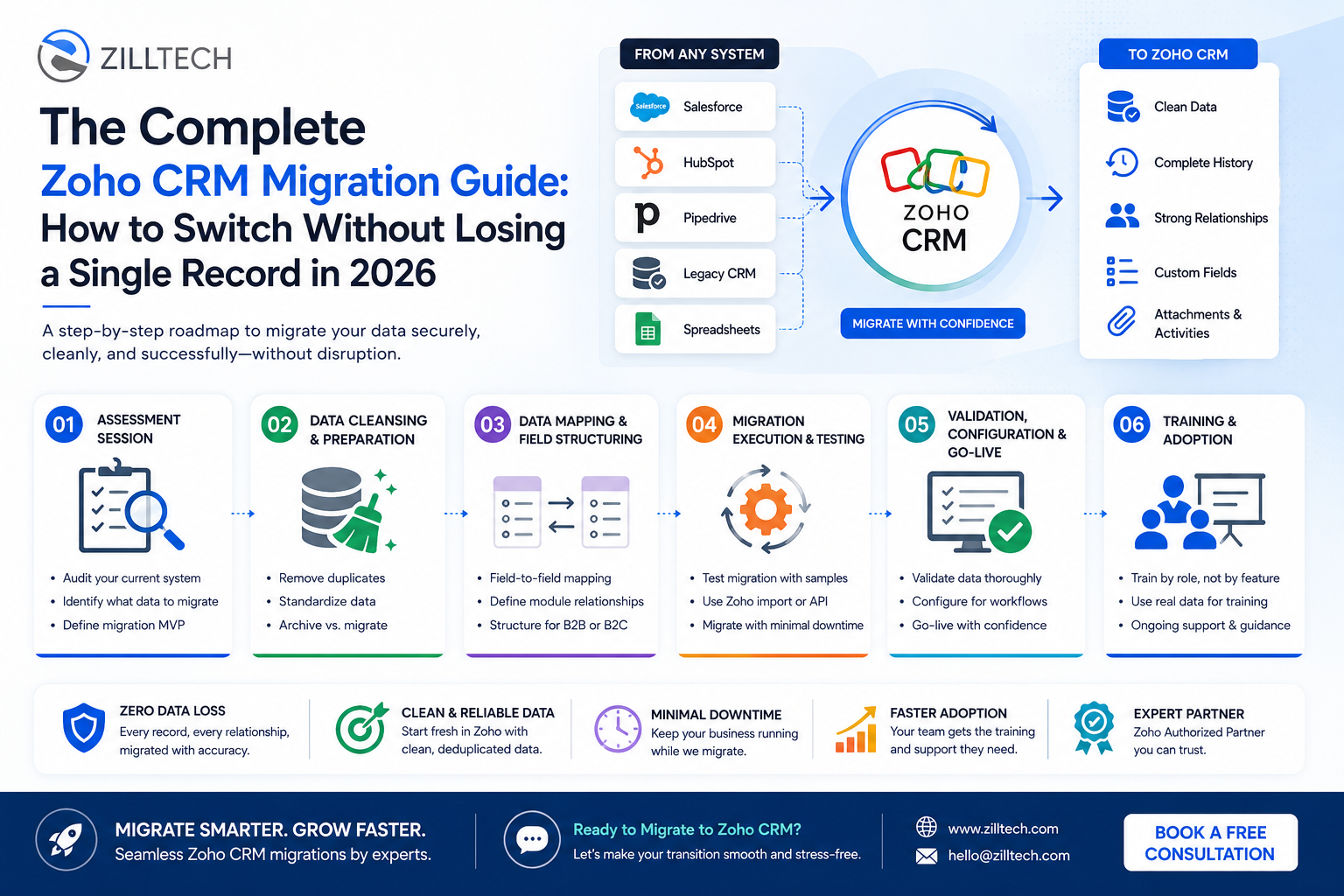
Step 3. Map your fields and pipelines
This is the most important technical step in a Zoho CRM migration.
For every field in Salesforce or HubSpot, decide where it goes in Zoho CRM. For example:
- Salesforce “Account” becomes Zoho “Account”
- HubSpot “Company” becomes Zoho “Account”
- Salesforce “Opportunity” becomes Zoho “Deal”
- HubSpot “Deal” becomes Zoho “Deal”
Then map the details. Pipeline stages, lead sources, deal types, and custom fields all need a home in Zoho. If a stage or field does not exist in Zoho yet, create it before the import, not after.
Pay special attention to:
- Owners: every record needs the right owner in Zoho, or it will be invisible to the right person
- Dates: close dates, created dates, and last activity dates must keep their format
- Currency and amounts: check that deal values import correctly, with no rounding or currency errors
- Relationships: a deal must stay linked to the right contact and company
A written field map, reviewed by your team, is the best protection against a bad migration.
Step 4. Clean your data
Clean the data in your old CRM before you export it, not after you import it into Zoho. Cleaning is faster and safer at the source.
- Merge duplicate contacts and companies
- Fix missing emails, phone numbers, and addresses where you can
- Standardize company names, job titles, and locations
- Remove test records and obvious junk data
- Decide who owns any record with no owner
If your data is very messy, a Zoho CRM migration consultant can run a data clean up as a separate first phase. It is worth the time. Clean data is the difference between a CRM your team trusts and one they ignore.
Step 5. Set up Zoho CRM before you import
Do not import data into a default Zoho setup. Set up Zoho first, so the data has somewhere correct to land.
That setup, covered in detail in our Zoho implementation guide, includes:
- Custom modules, fields, and layouts that match your field map
- Sales pipelines with your stages, not Zoho defaults
- User roles and permissions
- Lead sources and deal types
- Email integration and templates
Test the setup with a few sample records first. Create a contact, a deal, and a task by hand, and check that your reports show what you expect. Fix the setup now, while it is still easy to change.
Step 6. Test the migration with a small sample
Never do a full migration as your first import. Run a test migration with a small, real sample, for example 50 to 100 contacts and 20 to 30 deals, including a few complex ones.
Check every part of the test:
- Did all records arrive, with the right owners?
- Are contacts linked to the right companies and deals?
- Did notes, attachments, and history come across?
- Are pipeline stages, dates, and deal values correct?
- Do your reports and dashboards show the right numbers?
Fix the mapping and the import settings, then test again. Repeat until the test is clean. A test migration takes hours. Fixing a bad full migration takes days, and sometimes means starting over.
Step 7. Run the full migration and plan the cutover
Once the test is clean, plan the cutover. This is the moment you switch from your old CRM to Zoho.
A good cutover plan includes:
- A freeze date: after this date, no one adds or changes data in the old CRM, except for urgent updates
- A final export: the latest data, exported after the freeze
- A validation check: record counts, deal totals, and sample checks before you tell the team to switch
- A go live date: a Monday is often best, so the team has a full week with support available
- A rollback plan: what you do if a serious problem is found in the first 48 hours
Tell your team exactly when the switch happens and what to do if they find a problem. Give them one place to report issues, and one person who owns fixing them.
Step 8. Train your team and support them after launch
A migration is not finished when the data is in Zoho. It is finished when your team is using Zoho every day.
Train by role, as you would for any Zoho implementation. Salespeople need to know how to work a lead and a deal in Zoho. Managers need to know how to read the pipeline. Support staff need to know where customer history lives now.
Plan a review at 30 days. Check usage, clean up any fields no one uses, and fix the workflows that are creating noise. Check for missing data reports early, while the old CRM is still available as a reference.
Salesforce to Zoho CRM Migration: What Is Different?
Migrate from Salesforce to Zoho is the most common Zoho CRM migration we see, and it has a few specific challenges.
Salesforce is often highly customized. It may have custom objects, complex approval processes, and integrations that do not have a direct Zoho equivalent. That does not mean you cannot migrate. It means you need to decide, before the migration, which customizations to rebuild in Zoho, which to simplify, and which to drop.
Salesforce to Zoho CRM migration also needs care with:
- Opportunities and products: Salesforce opportunities often have product line items and complex pricing. Map these carefully to Zoho Deals and Products.
- Custom objects: if you use them in Salesforce, decide whether they become a custom module in Zoho, or whether the data belongs in a standard module.
- Reports and dashboards: your Salesforce reports will not migrate automatically. List the reports your team actually uses, and rebuild those in Zoho first.
Zoho to Salesforce migration is the reverse direction, and it is less common for our clients. If you are moving the other way, the same audit, mapping, and testing steps apply, but the cost and complexity are usually higher.
HubSpot to Zoho CRM Migration: What Is Different?
Zoho to HubSpot migration, and the reverse, HubSpot to Zoho, are usually simpler than Salesforce, because HubSpot is less customized. For a side by side feature and pricing comparison, see our Zoho CRM vs HubSpot CRM guide. The main work is:
- Mapping HubSpot contacts, companies, and deals to Zoho correctly
- Moving email history, notes, and engagement data
- Rebuilding HubSpot workflows and sequences as Zoho workflows
- Moving marketing lists and forms, if you use HubSpot for marketing
Check your HubSpot workflows before you migrate. Many HubSpot workflows are simple lead assignment or follow-up reminders, and they are easy to rebuild in Zoho. Complex lead scoring or nurture workflows may need a redesign, not a direct copy.
If you use HubSpot for marketing automation, decide whether that work moves to Zoho Campaigns, Zoho Marketing Automation, or stays in HubSpot while sales moves to Zoho. Mixing systems is possible, but it needs a clear integration plan.
How Long Does a Zoho CRM Migration Take?
For a US small or mid sized business, a typical Zoho CRM migration takes:
- Small, clean data set, Zoho CRM only: 2 to 4 weeks
- Medium data set with integrations and custom fields: 4 to 8 weeks
- Large or highly customized Salesforce migration: 8 to 12 weeks or more
The biggest factors are how much data you have, how clean it is, how customized your old CRM is, and how quickly your team can review the field map and the test migration. A clear scope and a single decision maker will shorten the timeline.
Ask for a timeline in writing, with what is included in each phase, before you start.
How Much Does a Zoho CRM Migration Cost?
Zoho CRM migration cost depends on the same factors as the timeline: data volume, data quality, customization, integrations, and training.
A small, clean migration with a standard setup will cost less than a large Salesforce migration with custom objects and multiple integrations. The Zoho subscription itself is separate, and it depends on the edition and number of users you choose. Small teams can start lean. Our guide to Zoho CRM for Small Business explains the features and pricing to look at first.
Rebuilding custom fields, workflows and reports is often the biggest variable in a migration quote. Use our free Zoho Customization Calculator to estimate what your customization could cost before you ask for a quote.
The cheapest migration is rarely the best one. A failed migration costs more in lost data, lost sales time, and rework than a proper migration costs in the first place. Ask for a written quote with a clear scope, and ask what is included in testing and post launch support.
DIY vs Hiring a Zoho CRM Migration Consultant
You can migrate to Zoho yourself using Zoho’s import tools, and for a very small business with clean data, that can work.
Hire a Zoho CRM migration consultant when:
- You are moving from Salesforce or HubSpot and cannot afford to lose data
- You have more than a few hundred active records, or complex history
- You need custom fields, pipelines, and integrations rebuilt in Zoho
- You need the migration done in weeks, with a planned cutover
- You want someone to own the testing, the validation, and the follow up
When you compare consultants, ask:
- Are you a Certified Zoho Partner, and how many migrations have you completed?
- How do you handle data mapping, testing, and validation?
- What is your cutover and rollback plan?
- What happens if data is missing after go live?
- What training and support do you provide after the migration?
Frequently Asked Questions About Zoho CRM Migration
Can I migrate from Salesforce to Zoho CRM without losing data?
Yes, if you audit, map, clean, and test the migration before the full import. The risk comes from skipping the test migration or mapping fields incorrectly, not from Zoho itself.
How long does a Zoho CRM migration take?
A small, clean migration usually takes 2 to 4 weeks. A medium migration takes 4 to 8 weeks. A large or highly customized Salesforce migration can take 8 to 12 weeks or more.
Can I migrate from HubSpot to Zoho CRM?
Yes. HubSpot contacts, companies, deals, notes, and history can be migrated to Zoho CRM. Workflows and marketing automation usually need to be rebuilt in Zoho, not copied directly.
Will my Zoho CRM migration include email history and attachments?
It can, if you plan for it. Export and map notes, attachments, and email history as part of the audit, and test them in the sample migration. Do not assume they will come across automatically.
Do I need to cancel Salesforce or HubSpot before I migrate?
No. Keep your old CRM active until after the migration is validated and your team is using Zoho. Cancel it only after the 30 day review, when you are confident nothing is missing.
What happens to my data if the migration fails?
A proper migration plan includes a test migration, a validation check, and a rollback plan. Your old CRM stays available as the source of truth until the migration is confirmed.
The Bottom Line
A Zoho CRM migration is not just an import. It is an audit, a clean up, a field map, a test, a cutover, and training, in that order. Skip a step and you will pay for it later, in missing data and a team that does not trust the new system.
If you want the move done safely, talk to ZillTech. We are Certified Zoho Consultants in Plano, Texas, and we help US businesses move from Salesforce and HubSpot to Zoho CRM without losing data.
Book a Zoho migration consultation with ZillTech today. Call +1 (469) 837-0172, or visit zilltech.net to learn more about our Zoho Consulting services. Tell us which CRM you are moving from and how much data you have, and we will show you what a safe Zoho CRM migration looks like for your business.