Zoho People is a cloud-based HR system that keeps employee records, leave, attendance, onboarding, and performance reviews in one place. For a growing team, the order of setup matters more than the feature list. Start with clean data, then configure the organisational structure, permissions, policies, workflows, and integrations. Finally, run a pilot before launching the system for everyone.
I have set up Zoho People for teams that had outgrown shared spreadsheets and WhatsApp groups for leave requests. The software was never the hard part. The real challenge was that nobody had documented the existing HR processes before we had to configure them. This guide follows the order I now use on every project, including the mistakes I would warn you about before you start.
What Does Zoho People Do for a Growing Team?
Think of Zoho People as a filing cabinet that also runs errands. The filing cabinet is Core HR: one record per employee containing job details, documents, reporting lines, and history. The errands are everything that happens around those records. A leave request goes to the right manager, a new hire receives a checklist, and an appraisal cycle opens on a date you choose.
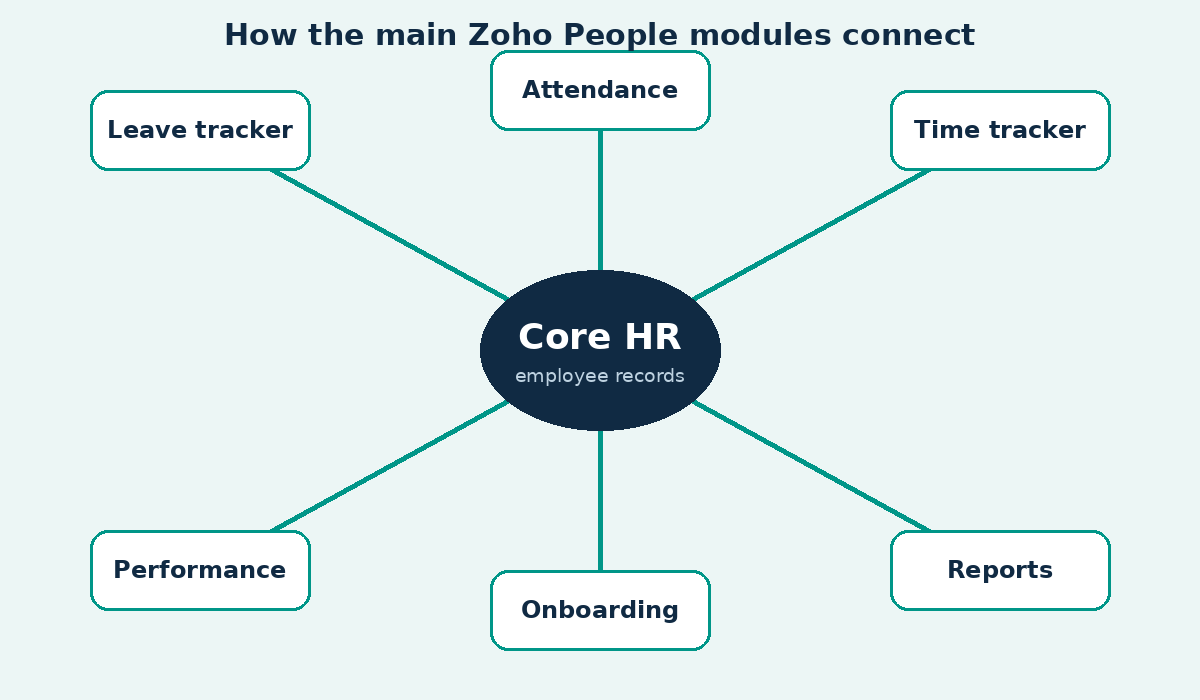
The modules I configure most often are Core HR, leave tracking, attendance, time tracking, performance management, and onboarding. Zoho also offers People Plus, a broader bundle that includes recruitment, payroll, and other applications. The right choice depends on your organisation’s size and how much of your HR work still happens through email.
Is Zoho People the Right Fit for Your Business?
Zoho People can be a good fit if you already use other Zoho applications, have roughly 20 to 500 employees, and want a small HR team to spend less time on administrative work. It may be less suitable if you need full payroll support across several countries from day one or rely on a long list of third-party integrations that Zoho does not support. I have advised prospects to consider other solutions when their requirements call for it. That honesty can save both sides a difficult project.
Which Zoho People Plan Should You Choose?
Zoho People offers a free tier for small teams and paid plans with additional features. Plan names, limits, and prices can vary by region and change over time. Published prices may also differ because of taxes and minimum user requirements. Rather than quote a figure that could become outdated, use the table below to identify your requirements and confirm the latest prices on Zoho’s official People pricing page.
| Plan Level | Who It Suits | What to Check Before Buying |
|---|---|---|
| Free | Very small teams testing the system | User limits and included modules |
| Essential HR | Teams that need employee records, leave management, and documents | Whether attendance is included, as some buyers assume it is |
| Professional | Teams that need attendance and timesheets | Shift management and time-tracking limits |
| Premium | Teams that manage appraisals and need more automation | Performance cycles, workflow rules, and AI features |
| Enterprise | Larger teams with specialised requirements | Sandbox access, custom functions, and advanced analytics |
| People Plus | Teams that want recruitment, payroll, and expense management in one bundle | Included applications and recruitment limits |
My rule is simple: if you plan to run formal appraisals, choose a plan that includes performance management. Upgrading during a project is possible, but it may require you to revise some forms. For a broader overview of Zoho expenses, see our Zoho cost guide for 2026.
How Do You Set Up Zoho People Step by Step?
Here is the order I follow when implementing Zoho People. Skipping steps is one of the most common reasons projects stall.
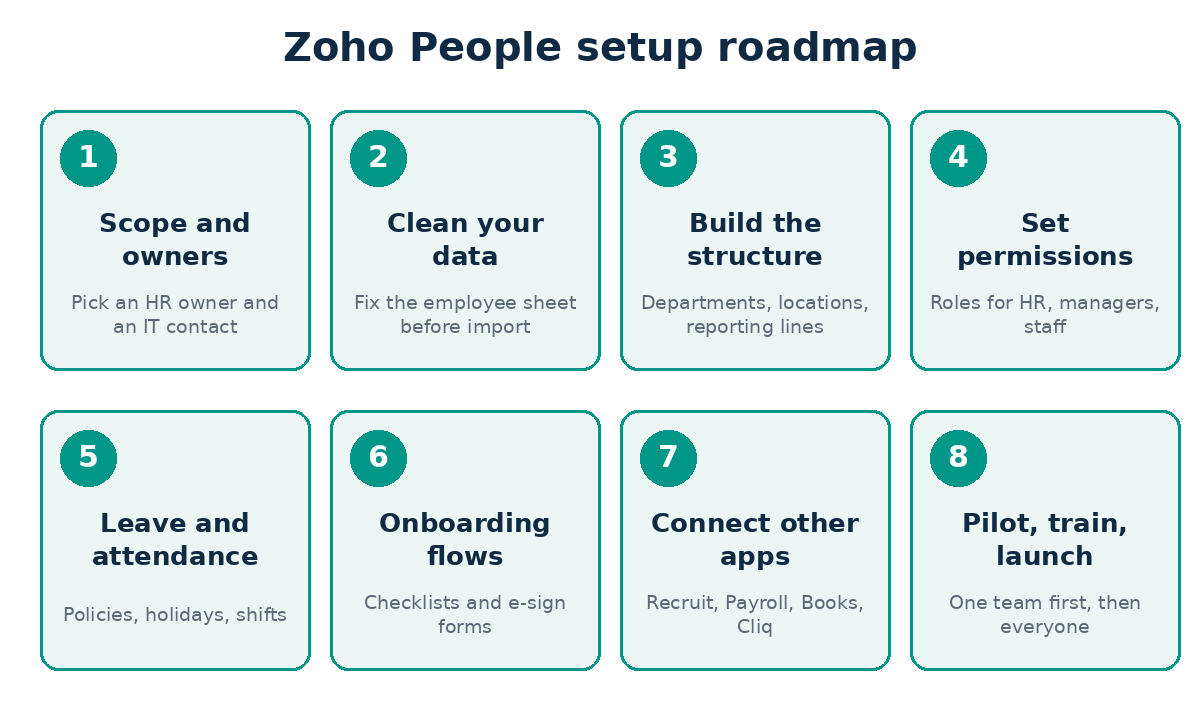
Step 1: Assign an Owner and Document Your Current Processes
Choose one person in HR to make decisions and one person in IT or operations to handle configuration. Ask them to document, on one page, how leave is requested and approved today. Many teams discover that each manager follows a different process. Resolve those differences on paper first. Software will faithfully reproduce a messy process and make it faster at being messy.
Step 2: Clean Your Employee Data Before Importing It
This is the step people most want to skip, yet it often determines whether the launch goes smoothly. Export your employee list and check for duplicate names, missing joining dates, inconsistent department names, and incorrect reporting managers. For example, a computer may treat Sales, sales, and Sales Team as three separate departments.
On one project, the import failed twice because manager names were entered differently from the corresponding employee names. Once we identified the problem, the fix took ten minutes. Finding it took most of an afternoon. If your data is scattered across spreadsheets, our guide to moving from Excel to Zoho may help.
Step 3: Build the Organisational Structure
Create departments, locations, designations, and business units before adding employees. Establish reporting lines at the same time. Everything that follows, from leave approvals to appraisal routing, depends on this structure. If a manager is missing from the hierarchy, their team’s requests may have nowhere to go.
Step 4: Configure Roles and Permissions
Decide who can access each type of information. At a minimum, you need an HR administrator role, a manager role, and an employee role. You may also need a restricted role for a finance contact who can view salary fields but cannot access unrelated employee information. Test each role by logging in as that type of user. I once saw an employee profile exposing salary information to the entire team because nobody had tested the default role. The issue was caught during the pilot, which is exactly why pilots matter.
Step 5: Configure Leave, Holidays, and Attendance
Create each leave type with its own rules, including annual leave, sick leave, unpaid leave, maternity or paternity leave, and any additional types required by local regulations. Define how leave accrues, whether unused days can be carried forward, and who approves requests. Add the holiday calendar for each location. Then configure shifts and attendance rules if your plan includes those features.
Use the table below as a checklist of policy decisions to make before configuring the system.
| Decision | Questions to Answer First | Common Mistake |
|---|---|---|
| Leave types | Which leave types exist, and which are paid? | Creating a separate type for every special case instead of using a flexible policy |
| Accrual | Does leave accrue monthly, annually, or from the joining date? | Forgetting to prorate leave for employees who join mid-year |
| Carry-forward rules | Is there a limit or an expiry date? | Allowing balances to grow without a defined limit |
| Approvals | Does approval require only the manager or both the manager and HR? | Creating lengthy approval chains that delay requests |
| Shifts | Are shifts fixed, rotating, or flexible? | Assigning the same shift to teams that work different hours |
| Holidays | Should there be one calendar or a separate calendar for each location? | Applying the head office holiday calendar to every location |
Step 6: Build Onboarding and Offboarding Workflows
Onboarding is an opportunity for a new HR system to build trust quickly. Create a checklist that starts when a new employee is added. Include documents to collect, accounts for IT to create, a welcome message, and a first-week schedule. Assign tasks to the manager as well, because managers can overlook important details. Offboarding follows the same principle in reverse, covering equipment returns, access removal, and exit forms.
Step 7: Connect the Other Tools You Use
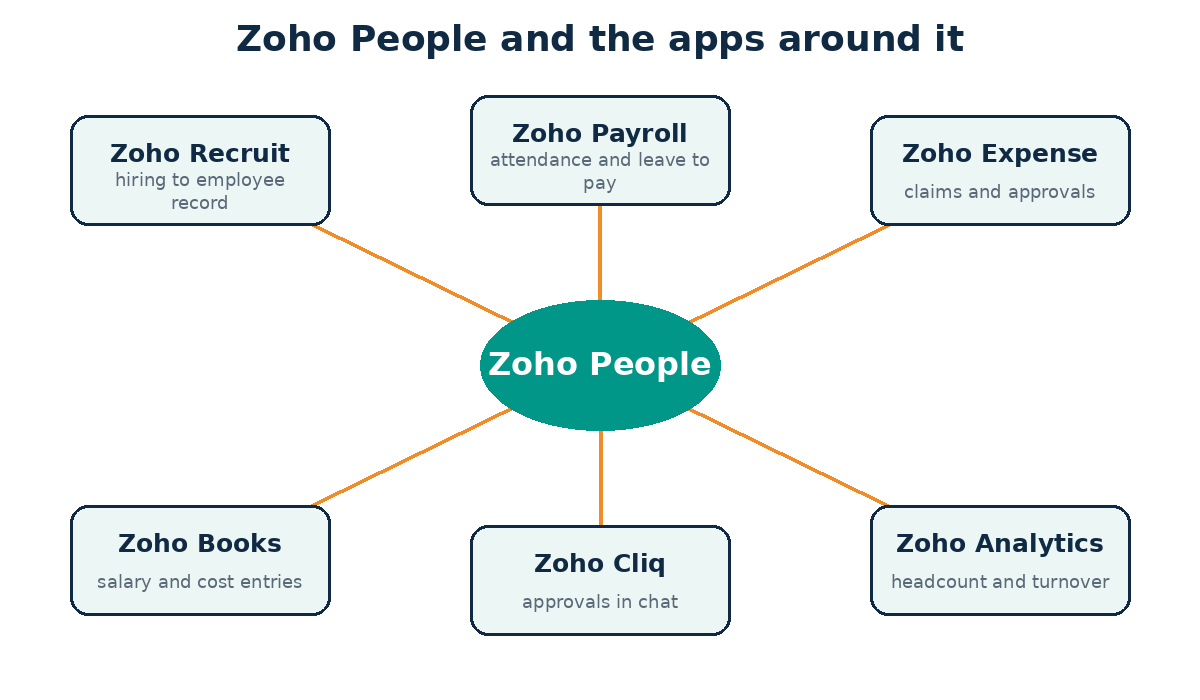
Zoho People connects naturally with other applications in the Zoho ecosystem. A candidate marked as hired in Zoho Recruit can become an employee record without requiring the information to be entered again. Attendance and leave data can support payroll processing. Approvals can appear in Zoho Cliq, allowing managers to respond from chat instead of logging in separately. If you hire regularly, read our Zoho Recruit and HR hiring guide.
For requirements that native integrations do not cover, Zoho Flow or the API may fill the gap. Our comparison of Zoho Flow and Zapier can help you choose an automation tool. If you would rather not build these connections yourself, our Zoho integration services can connect the systems for you. The official Zoho People help centre lists the current integration options.
Step 8: Run a Pilot, Train Your Team, and Launch
Choose a team of 10 to 20 people with a supportive manager. Process real leave requests and complete a real onboarding workflow through the system for two weeks. Record every issue in one list and resolve it before expanding access. Then train the remaining employees using a short session and a one-page reference guide. A 40-minute walkthrough is often more useful than a 50-page manual that nobody opens.
How Long Does a Zoho People Setup Take?
The timeline depends on the quality of your data and the number of policies you need to configure. The following are planning ranges I use when scoping projects. Treat them as estimates rather than guarantees.
| Team Size | Typical Scope | Planning Range |
|---|---|---|
| Up to 25 people | Core HR, leave management, and onboarding | 1 to 2 weeks |
| 25 to 100 people | Attendance, shifts, and one integration in addition to core HR | 3 to 5 weeks |
| 100 to 500 people | Performance cycles, multiple locations, and payroll integration | 6 to 12 weeks |
Most delays result from pending decisions rather than configuration work. If management is still debating the leave policy, the project cannot move forward until those discussions are resolved.
Common Zoho People Implementation Mistakes
| Mistake | What It Causes | What to Do Instead |
|---|---|---|
| Importing messy data | Failed imports and incorrect reporting lines | Clean and validate the data before importing it |
| Copying every old rule | Complex policies that nobody understands | Simplify the policies before configuring them |
| Skipping role testing | Private information becoming visible to unauthorised users | Test every role during the pilot |
| Buying a plan without checking its modules | Missing attendance or appraisal features later | Match the plan to your requirements before buying |
| Failing to assign an owner after launch | Outdated settings and accumulating workflow issues | Assign an administrator and review the setup quarterly |
My own early mistake was the second one. I used to reproduce a client’s old leave rules exactly, including every exception. Eventually, the HR manager struggled to explain the system to new employees. Now I recommend simplifying policies first. A policy that fits on half a page is often easier for people to understand and follow.
What Should You Measure After Launch?
Do not wait a year to find out whether the implementation worked. During the first quarter, measure how many leave requests are approved within two working days, how many new hires complete their checklists on time, how often employees ask HR questions the system should answer, and whether managers actively use the platform. If you need dashboards beyond the built-in reports, see our Zoho Analytics guide.
A Real Example of HR Automation with Zoho
If you want to see how these principles work in practice, read our case study on automating payroll operations for an HR and payroll firm. The approach is the same one used in this guide: define the process first, then automate it.
Should You Set It Up Yourself or Hire a Consultant?
If your business has fewer than 25 employees, straightforward policies, and someone in HR who can dedicate time to the project, you can set up Zoho People yourself using the official documentation. If you have multiple locations, payroll integrations, or a complex data migration, a consultant may save you time and reduce costly rework. Read our guide on what a Zoho consultant does before deciding, and see how our Zoho implementation services work.
Frequently Asked Questions
What Is Zoho People Used For?
Zoho People helps businesses manage the employee lifecycle, including employee records, leave, attendance, timesheets, onboarding, performance reviews, and HR reporting. Teams use it to replace spreadsheets and email-based approvals with a centralised HR system.
Is Zoho People Good for Small Businesses?
Yes. Zoho People can be a good option for small businesses, particularly those already using other Zoho applications. A free tier and entry-level paid plans can make it easier to get started. Check which modules your chosen plan includes, as attendance and performance management may require a higher-tier plan.
Can Zoho People Handle Payroll?
Zoho People primarily focuses on HR management. Payroll can be handled through Zoho Payroll, where available, or by integrating an external payroll solution. Confirm availability in your country on Zoho’s official People website.
How Long Does It Take to Implement Zoho People?
A small team may be ready to go live within one to two weeks. Larger organisations with multiple locations, attendance policies, and integrations should plan for several weeks or longer. The timeline depends largely on decision-making, data preparation, and testing.
Does Zoho People Work with Other Zoho Applications?
Yes. Zoho People integrates with applications such as Zoho Recruit, Payroll, Expense, Books, Cliq, CRM, and Analytics. Other systems can also be connected through Zoho Flow or the API, depending on your requirements.
Final Thoughts
A good Zoho People setup works quietly in the background. Leave requests get answered, new hires know what to expect on their first day, and HR spends less time answering the same questions every week. Start with clean data, keep policies simple, test every role, and run a pilot before launching the system across your organisation. If you would like a second opinion on your plan, contact the Zilltech team.