

Running customer support out of a shared inbox works for a while – until it doesn’t. Tickets get lost in CC threads, nobody knows who owns what, and response times quietly creep up. That’s usually the moment a business starts looking at dedicated helpdesk software, and Zoho Desk is one of the names that comes up most often, especially for teams that want solid ticketing without an enterprise price tag.
This guide walks through what Zoho Desk actually does, what it costs, how to set it up department by department, and how it stacks up against Zendesk and other alternatives.
What Is Zoho Desk?
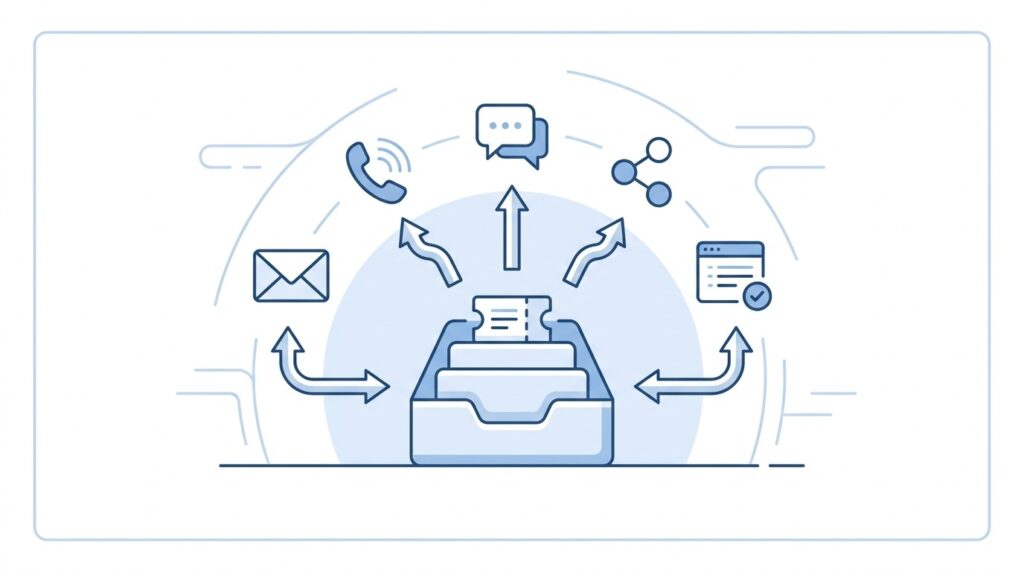
Zoho Desk is cloud-based customer-service software that converts requests coming in from email, phone, live chat, social media, web forms, and messaging apps into trackable support tickets. Agents work from a single workspace to assign, prioritize, respond to, escalate, and close those tickets, and the platform layers on knowledge bases, customer portals, automation, reporting, AI features, and integrations with Zoho CRM and other business tools.
In practice, Zoho Desk shows up in a wide range of use cases:
- Customer support and complaint management
- Technical support and troubleshooting
- Order, delivery, return, and warranty support
- Billing and payment enquiries
- Internal IT helpdesk requests
- Call-center ticket management
- SLA (service-level agreement) monitoring
- Self-service through FAQs and knowledge-base articles
- Multi-department or multi-brand support
Every ticket in the system typically carries the customer’s details, subject, description, full conversation history, status, priority, assigned agent, department, attachments, SLA deadlines, and resolution notes — everything an agent needs without digging through old emails.
Zoho Desk Pricing
| Edition | Price | What You Get |
|---|---|---|
| Free | Free forever, up to 3 users | Basic email ticketing and starter helpdesk capability |
| Express | ₹420/user/month | Email, social media, web forms, workflows, direct assignment, custom domain |
| Standard | ₹800/user/month | Business messaging (WhatsApp, etc.), knowledge base, Answer Bot, reports |
| Professional | ₹1,400/user/month | Telephony, Zia AI, Blueprints, multi-department support, round-robin assignment, webhooks |
| Enterprise | ₹2,400/user/month | Live chat, guided conversations, skill-based routing, IVR, multi-brand portals, sandbox |
Zoho also offers a 15-day free trial with no credit card required. Annual billing comes at a discount over monthly, and local taxes apply on top of the listed price.
A note for international buyers: if you’re pricing this out from outside India, check the number shown after you select your own billing currency and country exchange rates, regional pricing, and local tax rules can shift the final figure.
Which Plan Should You Pick?
- Small team, email support only → Free or Express
- Growing team that needs WhatsApp, knowledge base, reports → Standard
- Need phone support, multiple departments, deeper automation → Professional
- Large operation with IVR, live chat, multiple brands → Enterprise
A three-person support team, for example, can often start free if email ticketing covers their needs, and step up to Standard once WhatsApp, public help articles, and richer reporting become necessary.
Setting Up Zoho Desk: Step-by-Step

1. Define Your Support Structure First
Before touching any automation rules, nail down:
- Departments Sales, Billing, Technical Support, Returns, General Support
- Ticket statuses Open, In Progress, Waiting for Customer, Resolved, Closed
- Priorities Low, Medium, High, Urgent
- Support hours and holidays
- First-response and resolution targets
- Which agents own which department
- Escalation triggers
2. Connect Your Support Email
Email is usually the fastest on-ramp. In Zoho Desk: Setup → Channels → Email, add your support address, and configure the reply-from address. Incoming emails become tickets automatically, each with a unique ticket ID.
A typical baseline setup looks like:
- Customer-facing address:
support@yourcompany.com - Department: General Support
- Default status: Open
- Default priority: Medium
- Assignment rule: Round robin or department-based
Once forwarding is configured, verify that new emails create tickets, customers get an acknowledgement, replies stay threaded to the same ticket, attachments survive the trip, agent replies go out from the correct address, and spam or auto-replies aren’t spawning junk tickets.
3. Add Agents and Set Permissions
Create separate profiles for administrators, department managers, full support agents, finance/technical collaborators, and light users where your edition supports it. Give each role only the access it needs billing staff shouldn’t need system admin rights, and technical agents don’t need financial reports.
4. Configure Custom Ticket Fields
Useful fields to consider: order number, customer type, product/service, region, payment method, warranty status, issue category, preferred language, refund eligibility, severity, and account number.
Keep mandatory fields to a minimum every required field is friction for the agent and a chance for bad data entry.
5. Build Assignment and Automation Rules
Start small and dependable:
- Assign tickets by department or issue type
- Route billing keywords to the billing team automatically
- Flag messages containing “refund” or “payment failed” as high priority
- Send acknowledgement emails on ticket creation
- Escalate tickets nearing their SLA deadline
- Notify managers when urgent tickets go unanswered
- Auto-close resolved tickets after a waiting period
- Trigger a satisfaction survey post-resolution
6. Build Out Your Knowledge Base
Write articles for the questions your agents answer over and over: placing an order, resetting a password, delivery timelines, refund policy, warranty process, payment troubleshooting, account verification, and escalation contacts.
Keep articles short, with clear titles, step-by-step instructions, screenshots where useful, and a visible “last updated” date. The bar for a good article: a customer should be able to solve a routine problem without ever opening a ticket.
Zoho Desk can surface this content through a Help Center or an embedded ASAP widget, letting customers search articles, self-serve, chat, and submit tickets directly from your website or app.
For a deeper walkthrough, read our guide to building a Zoho Desk knowledge base and help center.
Zoho Desk Call Center Features
For phone support, Zoho Desk integrates with telephony providers so agents can view customer info, link calls to existing tickets, create new tickets mid-call, log call summaries, transfer calls, and manage everything from one screen.
A practical call workflow looks like this:
- Identify the caller by phone number, account, or order number
- Search for an existing open ticket
- Attach the call to that ticket, or create a new one
- Record the issue, promised action, and deadline
- Assign to the right department
- Send a follow-up email or SMS if needed
- Track the outcome and resolution
Telephony is available on the Professional plan, with advanced IVR reserved for Enterprise. Actual call costs will also depend on your chosen phone provider, number, minutes, and country coverage.
Creating Tickets from Email
There are two common paths:
Customer email → ticket. Set up a support address and forward incoming mail into Zoho Desk; each qualifying email becomes a ticket with its own ID. For reliability, use SPF, DKIM, and DMARC on your sending domain, handle auto-replies properly, filter out newsletters, prevent internal email loops, and decide how CC’d recipients get added as contacts or followers. Only split into addresses like billing@ or returns@ if separate routing is genuinely useful don’t fragment for the sake of it.
Agent creates a ticket and emails from it. An agent picks the contact, writes the subject and description, attaches files, and uses Send As Email. This is handy when a customer called or walked in, and you want both a written reply and an internal record in one place.
Zoho Desk vs. Zendesk
| Area | Zoho Desk | Zendesk |
|---|---|---|
| Price positioning | Lower-cost overall, with a free plan for up to 3 users. | Generally pricier, especially for full Suite capability. |
| Ecosystem | Deep integration with Zoho CRM, Books, Analytics, SalesIQ, and Projects. | Large third-party marketplace and strong standalone functionality. |
| Ease of entry | Attractive for small and mid-sized teams. | More planning is needed for broader configurations. |
| Ticketing | Email, web, social, messaging, phone, portals, and SLAs by edition. | Mature routing, workflows, messaging, and omnichannel support. |
| Customization | Good customization with workflows, Blueprints, functions, and webhooks on higher tiers. | Very extensive, enterprise-grade customization. |
| AI | Zia, Answer Bot, and other AI options vary by edition and region. | AI features vary by package and usage. |
| Best fit | Cost-conscious teams, existing Zoho users, and integrated stacks. | Larger, complex support organizations needing enterprise tooling. |
Both platforms cover ticketing, automation, self-service, reporting, and omnichannel support. The right choice depends more on your existing tools, budget, and support complexity than on a feature-by-feature checklist. Zoho positions itself as the lower-cost alternative to Zendesk, and independent comparisons generally agree that Zoho tends to be more affordable and quicker to configure, while Zendesk offers deeper enterprise-scale capability at a higher price point. As with any vendor comparison, treat marketing pages as a starting point, not the final word.
Choose Zoho Desk if:
- You’re already on Zoho CRM or other Zoho products
- Lower per-agent cost matters
- This is your first formal helpdesk
- You need email, web forms, messaging, knowledge base, or telephony without heavy enterprise complexity
- You’re comfortable configuring the system in-house
Choose Zendesk if:
- Your support operation is large and highly specialized
- You need mature enterprise routing or extensive marketplace add-ons
- Budget allows for a pricier stack
- Your team already has Zendesk expertise
Other Zoho Desk Alternatives
Beyond Zendesk, worth a look depending on your needs:
- Freshdesk quick deployment, straightforward ticketing
- HubSpot Service Hub support tightly integrated with CRM and marketing
- Intercom conversational support, chat-first, product-led
- Help Scout simple shared-inbox experience
- Jira Service Management better fit for IT, engineering, and internal service workflows
- Salesforce Service Cloud natural fit if you’re already on Salesforce
- Gorgias built for ecommerce support
- Front shared inbox and team collaboration
- Kayako another conversation-management alternative
If your main need is internal IT support rather than customer-facing service, Jira Service Management is usually a more relevant comparison than a conventional helpdesk.
A Practical Rollout Plan
For a first deployment, this sequence tends to work well:
- Start with one department and one support email
- Define 5–7 ticket statuses
- Add a small set of custom fields
- Create acknowledgement, assignment, and escalation rules
- Build out your most common knowledge-base articles
- Train agents on ticket ownership, internal notes, tags, and closure rules
- Test email threading, attachments, notifications, and permissions end-to-end
- Review first-response time, resolution time, backlog, and reopen rate weekly
- Add chat, WhatsApp, telephony, and API integrations only once the basics are stable
- Reassess your plan after seeing real ticket volume and agent
Final Thoughts
For most growing businesses, Zoho Desk is a strong starting point especially when affordability, Zoho integrations, and room to scale gradually matter more than maximum enterprise complexity from day one. The most useful next step is to run the 15-day trial with real support scenarios, then calculate the actual monthly cost for your specific number of agents and channels before committing.
Want help with the rollout? Our Zoho implementation services team can set Zoho Desk up around your support workflow.
FAQ
Is Zoho Desk free?
Yes the Free edition supports up to 3 users with basic email ticketing, no cost.
How much does Zoho Desk cost per agent?
Paid editions range from roughly ₹420/user/month (Express) to ₹2,400/user/month (Enterprise) on annual billing, before local taxes. Actual pricing depends on your billing country and currency.
Is Zoho Desk better than Zendesk?
Neither is universally “better” Zoho Desk tends to be more affordable and faster to set up, while Zendesk offers deeper enterprise-grade customization. The right choice depends on team size, budget, and existing tools.
Can Zoho Desk handle phone support?
Yes, through telephony integrations on the Professional plan, with advanced IVR available on Enterprise.
Does Zoho Desk have an API?
Yes a REST API (POST /api/v1/tickets for ticket





