

Most guides to project management software for consultants treat this as a feature comparison problem: does the tool have Gantt charts, does it have a client portal, does it track billable hours. Those questions matter. But for a consultant, the bigger question is usually a stack question, does this tool talk to the CRM and accounting system you’re already running, or does it become one more disconnected app your team has to update by hand?
Quick answer: If you’re a solo or boutique consultant, start with Bonsai or Notion. If your practice already runs on Zoho, Zoho Projects is the strongest pick because it connects natively to Zoho CRM and Zoho Books, with no separate sync required. If you’re unsure whether Zoho Projects is the right fit for your consulting workflow, book a free Zoho consultation to discuss your requirements with a Zoho expert. If you’re a growing firm that bills hourly and needs deep utilization and margin reporting, look at Scoro, Rocketlane, or Productive. Enterprise firms with complex revenue recognition needs should look at Certinia or Deltek Vantagepoint.
The rest of this guide breaks down why, by firm size and by how the tool fits into the rest of your business.
What Makes Project Management Software “for Consultants” Different?
A generic project management tool tracks tasks and due dates. That’s fine for an internal team. It falls apart the moment your business model depends on billing for time, protecting margin on fixed-fee work, and keeping clients updated without a member of your team writing a status email every Friday.

Software built for consulting work needs to handle a few things a generic tracker usually can’t:
- Billable hours that connect to invoicing. Time logged against a task should be able to become a line item on an invoice without you exporting anything to a spreadsheet first.
- Utilization and margin visibility. You need to see, in real time, whether a project is tracking to profit, not find out after it closes.
- A client-facing portal. Clients want to check status themselves. A shared folder or a weekly email isn’t the same thing as a proper portal with permissions. Multiple billing models. Fixed-fee, time-and-materials, and retainer work often exist side by side in the same practice, and the tool needs to handle all three.
- A real connection to the rest of your stack. This is the piece most comparison guides skip. If your CRM, your project tool, and your accounting software don’t talk to each other, someone on your team is the integration copying data by hand, and quietly eating hours nobody bills for..
That last point is worth pausing on, because it’s the difference between “professional services automation” (PSA) and a plain project management tool. A PSA platform is built to connect delivery work to the money: time, budgets, invoicing, and margin all live in one system. A project management tool tracks the work itself and generally assumes billing happens somewhere else. Neither is universally “better”, a five-person practice doesn’t need full PSA depth, and a 40-person firm billing hourly across a dozen active clients usually can’t function without it. The right category depends on your size and how tightly your delivery work is tied to your revenue.
Quick Comparison
| Tool | Best For | Free Plan | Starting Price | Client Portal | CRM Integration |
|---|---|---|---|---|---|
| Bonsai | Solo consultants | No | ~$25/mo | Yes | Limited |
| Notion | Docs-heavy solo practices | Yes | $10/user/mo | Basic | Via integrations |
| Zoho Projects | Firms already on Zoho CRM | Yes (3 users) | Free–$5/user/mo | Yes | Native (Zoho CRM, Books) |
| Teamwork | Small-to-mid consulting/agency teams | No | ~$11/user/mo | Yes | Via integrations |
| Productive.io | Boutique firms needing PSA-lite | No | ~$9–11/user/mo | Basic | Via integrations |
| Scoro | SMB firms wanting PM + CRM + financials in one | No | ~$26/user/mo | Basic | Native (built-in CRM) |
| Rocketlane | Mid-size PSA with client portal focus | No | ~$19/user/mo | Yes (Native) | Salesforce / HubSpot Native |
| Certinia | Enterprise, Salesforce-native firms | No | Contact Sales | Limited | Salesforce-native only |
Pricing changes often, treat this as a starting point for your shortlist, not a final quote.
Best Project Management Software for Consultants, by Firm Size
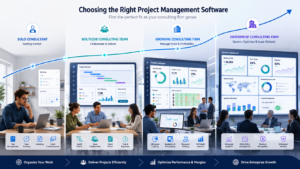
Best for Solo & Boutique Consultants
If it’s just you, or you and a couple of contractors, you don’t need utilization dashboards or resource-planning tools. You need to look professional, keep client work organized, and get paid without a second piece of software.
Bonsai bundles proposals, contracts, time tracking, and invoicing into one subscription, which covers most of what a one-person practice needs without stitching tools together. The trade-off shows up once you grow past a handful of people, it doesn’t have real resource planning or margin reporting.
Notion works well if your consulting output is mostly documents, frameworks, deliverables, meeting notes. It’s flexible and the free plan is genuinely usable for a solo practice. It isn’t a billing tool, though, so you’ll invoice somewhere else.
Best for Small-to-Mid Firms Already Running a CRM
This is the tier most comparison guides skip, and it’s where the stack question matters most.
Zoho Projects is the strongest option if your practice already runs Zoho CRM, or you’re planning to. Won deals in Zoho CRM can convert directly into a project without re-entering client data, and logged hours flow into Zoho Books for invoicing. so, the handoff from “we won the deal” to “we’re delivering and billing for it” happens inside one ecosystem instead of across three logins. It includes Gantt charts, task dependencies, blueprint automation for repeatable workflows, and client-level user access so clients can see progress without full internal visibility.
Where it’s honestly weaker: project management depth and reporting sophistication trail dedicated PSA platforms like Rocketlane or Scoro once you’re running dozens of concurrent engagements with complex margin reporting needs. For a firm in the 5–40 person range that’s already committed to the Zoho ecosystem, though, the integration alone tends to outweigh that gap, the alternative is running a best-in-class PM tool next to Zoho CRM with no connection between the two, which just recreates the fragmentation problem in a different shape.
Teamwork is a solid non-Zoho alternative in this tier, native client portal, built-in time tracking, and basic invoicing, without full PSA complexity. It doesn’t connect natively to a CRM, so you’re still bridging that gap with an integration tool like Zapier.
Productive.io covers similar ground with stronger budgeting and profitability tracking, aimed at boutique firms that have outgrown spreadsheets but don’t want enterprise-level complexity.
Best PSA Platforms for Mid-Size & Growing Firms
Once a firm is billing hourly across a real team and margin visibility becomes the main
operational question, generic PM tools and light PSA options stop being enough.
Scoro combines project management, CRM, quoting, and financial reporting in one system, with financial reporting being its strongest feature relative to price. It’s a reasonable middle ground for firms that want CRM and delivery in the same platform without moving to a fully separate PSA and CRM stack.
Rocketlane is built specifically around client-facing delivery — a native, white-labeled client portal, deep resource and utilization tracking, and support for fixed-fee, T&M, and retainer billing side by side. It integrates with Salesforce and HubSpot rather than Zoho, so it’s a better fit for firms on those CRMs than for a Zoho-based practice.
Productive.io (mentioned above) also fits here for firms that have grown past the “just need a client portal” stage but aren’t yet enterprise-scale.
Best for Enterprise Consulting Firms
At 150+ staff, the requirements shift toward revenue recognition (ASC 606/IFRS 15), multi entity billing, and governance controls that smaller tools don’t attempt to solve.
Certinia (formerly FinancialForce) is Salesforce-native and strong on financial and revenue-recognition depth, though its project management functionality is consistently described as weaker than dedicated PM tools — many teams running Certinia still keep a separate PM tool alongside it for daily delivery work.
Deltek Vantagepoint targets architecture, engineering, and consulting firms that need integrated accounting and project management at scale, with a focus on forecasting and resource management for larger operations.
These platforms are overbuilt for anything under roughly 100 staff — the complexity and cost only pay off once financial governance, not delivery visibility, is the primary bottleneck.
Project Management Software That Integrates With Your CRM
This is worth its own section because it’s the part most comparison content treats as an afterthought, a bullet point buried under “integrations” rather than a real decision factor.
Here’s the pattern that plays out at a lot of consulting firms: a deal closes in the CRM. Someone often the consultant themselves, manually creates a project in a separate tool, re-typing the client’s name, contact details, and scope that already exist in the CRM record. Time gets tracked in the project tool. Invoicing happens in a third system, or back in the accounting software, referencing numbers that have to be manually reconciled against what was logged. Every one of those handoffs is a place where data gets duplicated, forgotten, or simply wrong.
What good integration actually looks like is a won deal in the CRM triggering project creation automatically, with the client record, scope, and any quoted line items carried over, not re-entered. Logged time should flow into the accounting or invoicing system without an export step. And a client, ideally, should see one portal rather than being asked to log into a CRM-adjacent tool and a separate invoicing tool to understand where their project stands.
For firms already invested in Zoho, this is where Zoho Projects earns its place. it’s built to sit next to Zoho CRM and Zoho Books natively, so the handoffs described above are configuration, not custom integration work.. Salesforce-native firms get a similar advantage from Certinia or Rocketlane’s Salesforce sync. The broader point holds regardless of which CRM you’re on: the tool that fits your existing stack usually beats the tool with the most features, because the features only help if the data behind them isn’t fragmented across five logins.
Must-Have Features Checklist
Before you start trials, it’s worth having a short list of non-negotiables so you’re not seduced by a long feature list that doesn’t actually solve your problem:
- Billable time tracking that connects directly to invoicing
- A client-facing portal with permission controls
- Support for fixed-fee, time-and-materials, and retainer billing even if you only use one today
- Resource or utilization visibility, once you have more than a couple of people
- A real (not workaround) connection to your CRM and accounting software
- Pricing that makes sense at your actual team size per-seat costs compound fast once you add contractors or client guests
How to Choose the Right Tool for Your Practice
Start by naming your actual bottleneck, because it routes most of the decision:
If the problem is financial visibility — you don’t know which projects are profitable until they close, a PSA platform with real budget-vs-actual reporting earns its cost quickly. Scoro or Rocketlane are the better starting points.
If the problem is client delivery and communication — status updates happening over scattered email threads, clients asking “where are we?” — a tool with a strong native portal matters more than deep financial reporting. Teamwork, Zoho Projects, or Bonsai (depending on firm size) fit better here.
If the problem is toolfragmentation itself — you’re already paying for a CRM, a PM tool, and accounting software that don’t talk to each other — the integration question should outweigh any individual feature comparison. Start with whichever tool connects natively to the CRM you already have, rather than adding a fourth disconnected system.
Watch per-seat pricing as your team grows — it climbs faster than most firms expect once associates and contractors get added. And before committing, run one real, live engagement through your top two choices rather than judging from a demo. A tool that looks clean in a sales call can still fall apart against your actual billing structure.
Frequently Ask Questions (FAQs)
What is the best project management software for consultants?
It depends on firm size and what’s already in your stack. Solo consultants tend to do best with Bonsai or Notion. Firms already running Zoho CRM get the most value from Zoho Projects because of the native integration. Growing firms that bill hourly and need deep margin reporting are better served by Scoro or Rocketlane. Enterprise firms with complex revenue recognition needs should look at Certinia or Deltek Vantagepoint.
What’s the difference between PSA software and project management software?
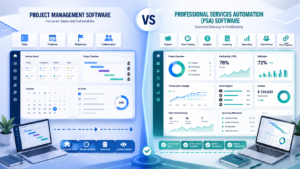
A project management tool tracks tasks, timelines, and deliverables. Professional services automation (PSA) software connects that delivery work directly to the money — time tracking, budgets, invoicing, and margin reporting all live in the same system. Small practices usually don’t need full PSA depth; firms billing hourly across a real team typically outgrow plain PM tools.
What is the best project management software for a solo consultant?
Bonsai is a strong all-in-one option, bundling contracts, time tracking, and invoicing so a one-person practice can run without a second tool. Notion suits a solo consultant whose work is mostly documents and frameworks, though it isn’t a billing tool.
Does project management software need to integrate with my CRM?
Not strictly, but the lack of integration is usually where hours quietly disappear — re-entering client data, manually reconciling time against invoices, or copying project status into client emails. If you already run a CRM, choosing a project tool that connects to it natively (rather than through a workaround) saves meaningful admin time as your client list grows.
Is Zoho Projects good for consultants?
Yes, particularly for firms already using or considering Zoho CRM. Won deals can convert into projects without re-entering client data, and logged time flows into Zoho Books for invoicing. Its project management depth is lighter than dedicated PSA platforms like Rocketlane or Scoro, so very large firms with complex multi-entity billing may outgrow it — but for practices under roughly 40 staff on the Zoho ecosystem, the integration typically outweighs that gap.
What’s the cheapest project management software for a small consulting firm?
Zoho Projects has a usable free tier for up to three users and low per-user pricing beyond that. ClickUp and Monday.com also have accessible entry points, though neither includes native billing or CRM integration out of the box.
Do I need a client portal in my project management tool?
If clients regularly ask for status updates, a portal is usually worth it, it replaces recurring status emails with something clients can check themselves, and it tends to reduce the volume of “where are we?” messages significantly. For very small or infrequent engagements, a shared document may still be enough.
If your practice already runs on Zoho or you’re evaluating whether it’s the right fit ZillTech helps consulting and professional services firms implement, integrate, and automate Zoho CRM, Projects, and Books into one connected system instead of a collection of disconnected tools. See how we’ve solved this for other firms, or Schedule a free consultation to explore what a fully connected workflow could look like for your practice.
Related reading
- Want a PM tool tailored to your practice? Custom Zoho applications
- How to build custom business apps with Zoho Creator





