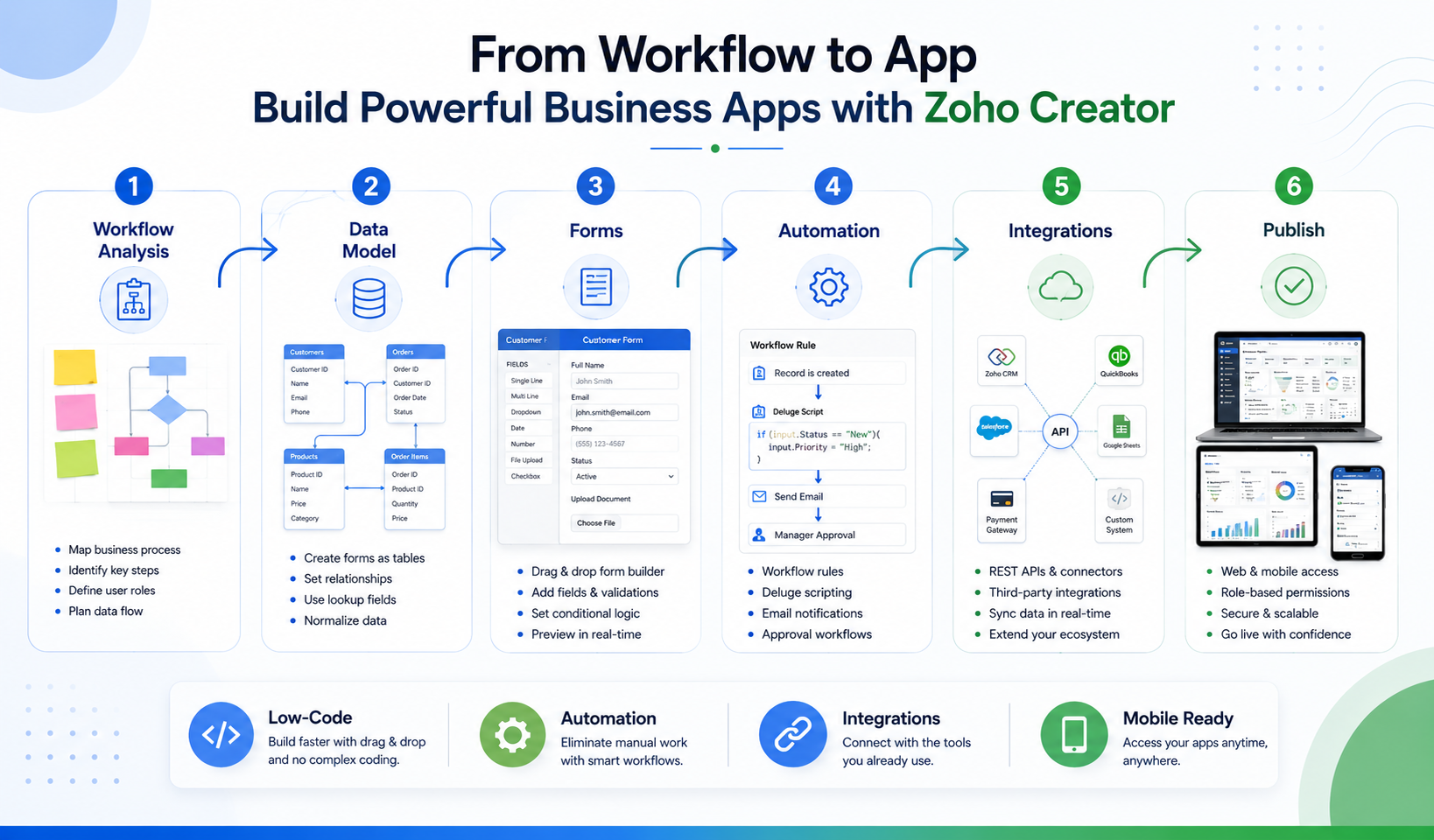
This guide walks through that process in order, including what it costs in 2026, how it integrates with other tools, whether it’s secure enough for regulated work, and how it compares with Microsoft Power Apps and Airtable. If you’re still deciding whether Creator is the right tool, start with the section below. If you’re ready to build, skip ahead to the step-by-step walkthrough. And if you’d rather have specialists build it, ZillTech’s Zoho applications and Creator services cover custom app builds from planning to launch.
What is Zoho Creator and what is it used for?

Zoho Creator is a low-code/no-code application development platform that lets businesses build custom web and mobile apps, automate workflows, and connect other tools without extensive coding. You design the app visually, and Creator publishes it to browsers, tablets, and iOS and Android devices.
Zoho positions Creator as its low-code platform within a broader business software suite that also includes Zoho CRM, Zoho Flow, and Zoho Analytics. That matters for scoping: Creator is what you reach for when a ready-made tool doesn’t fit your process. If you’re weighing how Creator sits alongside the rest of the suite, ZillTech’s pros and cons of the Zoho ecosystem is a useful companion read.
The typical use cases are:
- Internal tools and operational trackers
- Field operations and mobile data capture
- Multi-level approvals
- Case management
- Customer, partner, and vendor portals
It’s built mainly for operations managers, IT admins, and small to mid-market teams that have outgrown spreadsheets but don’t have a development team to spare.
What problems does Zoho Creator solve?
Creator mainly replaces the patchwork of spreadsheets, email approvals, and disconnected tools that many teams run on. In practice, the pain points it targets are:
- Data scattered across spreadsheets
- Approvals that live in inboxes
- Processes with no audit trail
- Staff who can’t reach records from the field
Zoho says Creator is “trusted by over 30,000 businesses worldwide”. That is a vendor-reported figure. Zoho’s own pages have cited different totals over time (22,000+ on an older case-study page, 40K+ on its homepage), so treat it as a directional signal of adoption, not an independently audited number.
What types of apps can you build with Zoho Creator?

You can build almost any data-and-workflow app: onboarding trackers, helpdesks, asset tracking, field service job sheets, compliance logs, and patient intake forms, to name a few. Zoho’s own FAQ describes it as suitable for anything from a task manager to a CRM. For a closer look at planning and shipping apps like these, see ZillTech’s guide to building custom business apps with Zoho Creator.
The clearest real-world example I found is Srikamatchi Medical Centre, a 300-bed hospital in Thanjavur, India. Its engineering, biomedical, facility, and safety teams were running on paper registers. Rather than one app, they built a suite of interconnected Creator apps covering:
- Asset management and preventive maintenance
- Calibration and fire-safety operations
- Utility monitoring
- Document management
Two design choices are worth copying. Every asset got a QR code linking to its full record, and the apps were built mobile-first so technicians could log work where it happens. The hospital reports a roughly 40% productivity improvement, 2–3 hours saved per technician per day, and about ₹400,000 saved monthly through real-time utility monitoring. These are self-reported by the customer through Zoho’s case study. We’ll come back to this example, and to the other case studies, in the results section.
Note that this deployment covers non-clinical facility operations. The hospital’s clinical departments use dedicated healthcare systems.
How does Zoho Creator fit into the low-code market?
Analysts treat Zoho as a credible but not dominant player. Zoho is positioned as a Challenger in the 2024 Gartner Magic Quadrant for Enterprise Low-Code Application Platforms (Gartner, October 2024). A Challenger is strong on execution but is not classed a Leader. Gartner also cautions that its research should not be read as an endorsement of any vendor.
The wider category is mainstream. A Forrester report from September 2025 says low-code is a first-class development technology in North America, based on a 2024 survey of more than 2,000 developers.
This context helps you frame the decision. Low-code is no longer a fringe choice, and Creator is one of several serious options. The comparison section later in this guide covers how it stacks up against Power Apps and Airtable.
How much does Zoho Creator cost in 2026?

As of September 2026, Zoho Creator has a free plan and three paid plans billed per user: roughly $8 (Standard), $20 (Professional) and $25 (Enterprise) per user per month, billed annually, according to Zoho’s own plan comparison. Monthly billing costs more. Enterprises with uneven usage can ask about Flex, a custom plan where you pick the features and limits you need and Zoho prices them accordingly.
That per-user model is the main thing to plan around. Ten people on Standard is about $80 a month. Twenty-five on Professional is about $500. The license is only part of the bill, though. Building the app is a separate cost, whether you do it yourself or hire a partner. ZillTech is a Zoho partner that scopes implementation separately from your Zoho licences, and it offers a free initial consultation, so you can get a fixed quote before committing.
What are the main differences between Free, Standard, Professional, and Enterprise?
Here is how the plans compare, from Zoho’s plan comparison page:
| Feature | Free | Standard | Professional Most popular | Enterprise |
|---|---|---|---|---|
| Price (per user/month, annual billing) | $0 | ~$8 | ~$20 | ~$25 |
| Apps | 1 | 1 | Unlimited | Unlimited |
| Records | 5,000 | 25,000/user | 100,000/user | 250,000/user |
| Storage | 250 MB | 1 GB/user | 3 GB/user | 5 GB/user |
| Emails per user per day | 50 | 100 | 250 | 500 |
| Custom schedules | – | 90/user/month | 300/user/month | 600/user/month |
| Cloud function calls | – | 50/user/day | 100/user/day | 200/user/day |
| Data sources / custom connectors | – | 5 / 5 | 15 / 10 | 30 / 20 |
| Custom AI models / ready-to-use AI models | – | 20 / 50 | 100 / 250 | 100 / 250 |
| Portal permission sets | – | 10/app | 50/app | 250/app |
| Custom domain, rebranded mobile apps, SAML SSO | – | Add-on | Add-on | Included |
| Flow, Analytics, RPA, QEngine access | – | – | – | Included |
What are the key usage limits you need to plan for?
Most limits scale with your headcount, which is why costs and capacity rise together. Plan around five areas:
- Records and storage: per-user allowances (see the table) pool across your team.
- Email notifications: 100 to 500 per user per day, depending on plan.
- Workflow executions: 10,000 Deluge execution statements on Standard, 20,000 on Professional, and 50,000 on Enterprise. Custom schedules and cloud function calls have their own caps.
- APIs: the developer API allows 250, 500, or 1,000 calls per user per day on Standard, Professional, and Enterprise. Custom APIs allow 100, 250, or 500.
- Portal users: every paid plan includes three, and outside users beyond that are billed through an add-on that one Zoho consultancy puts at roughly $100 a month for 250 users.
If you have high-volume integrations or heavy Deluge logic, the design decisions you make early determine whether you stay inside these limits. That is where a specialist helps. ZillTech’s Zoho customization and automation services cover Deluge scripting, and its Zoho integration services cover API connections and tools like Zoho Flow. For scoping a build before you commit, its Zoho consulting team maps processes to the right apps.
Is there a free trial or free plan?
Yes, both. Zoho offers a free plan and a 15-day free trial of the paid plans, and Zoho’s free app builder page says the trial needs no credit card and moves you to the Free plan afterward if you don’t upgrade. The Free plan covers one app with 5,000 records and 250 MB of storage, which is enough to test an idea but not to run a business process.
Two other costs are worth knowing about:
- Support plans: Classic support is free with paid plans. Premium costs 20% of your license fee, and Enterprise support costs 25% with a minimum of 50 users and annual billing.
- Zoho One: if you already need several Zoho apps, one 2026 pricing guide says the Zoho One bundle at about $37 per user per month (all employees) includes Creator, and another says it’s at the Professional tier. Always compare this against buying Creator on its own.
If you’re weighing licences against implementation, ZillTech’s Zoho implementation services page is the place to start. Its FAQ says most projects run two to six weeks and that Zoho licences are paid directly to Zoho, separate from its implementation fee.
How do you use Zoho Creator to build your first app?
You use Zoho Creator by planning the process, creating an application and data model, building forms, reports, and dashboards, adding workflows and approvals, setting roles and permissions, and then testing and deploying to web and mobile. Everything except the Deluge scripting is drag-and-drop, so a small pilot app is realistic for a non-developer.
To keep the steps concrete, I’ll use a Client Onboarding & Approval app as the running example.
Step 1: How do you plan your app before building?
Use this checklist first:
| Question | Onboarding example |
|---|---|
| What problem are we solving? | Sales-to-implementation handoffs get lost in email |
| Who uses it? | Sales rep, onboarding manager, client (portal) |
| What data do we track? | Clients, onboarding requests, tasks |
| What decisions or actions? | Manager approval, status changes, automatic emails |
| What reports do we need? | Open requests per manager, overdue tasks |
| What permissions? | Reps see their own records; managers see all |
Step 2: How do you create an application and data model in Zoho Creator?
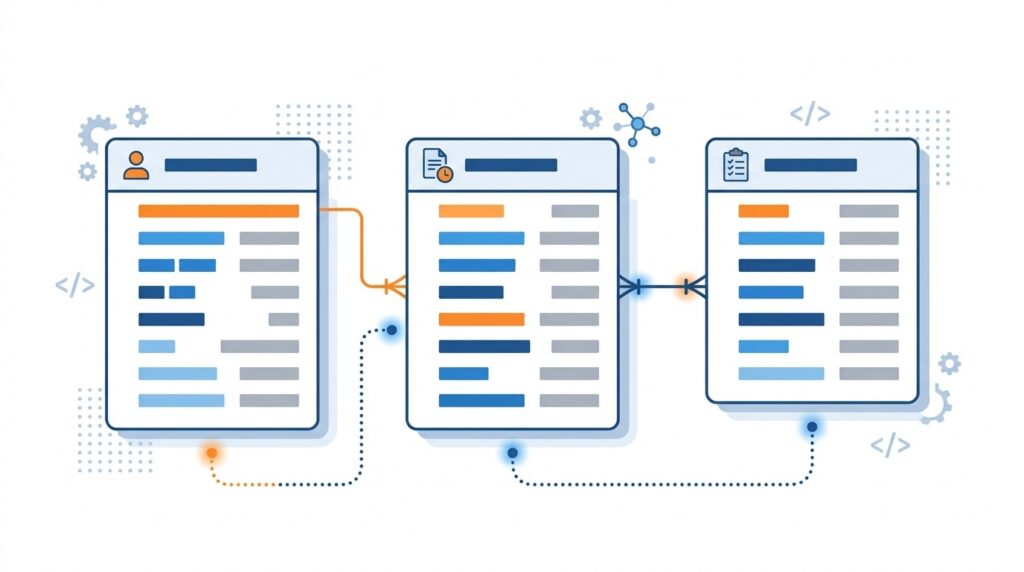
Create a new application from scratch or from one of Zoho’s 50+ pre-built templates, then build one form per main data type. For our example, that means Client, Onboarding Request, and Task.
Connect the forms with lookup fields. One client can have many requests, and one request can have many tasks, so each child form gets a lookup to its parent. This is what later lets you report on “all requests for a given client.” A useful rule from Brockbank: if one form is getting crammed with unrelated data, split some of it into its own related form.
Zoho Creator offers 32 field types, including advanced fields for payments and digital signatures on paid plans. One plan limit to keep in mind: Free and Standard allow a single app, so if this pilot is the first of several, Professional is the realistic choice.
If your data currently lives in spreadsheets or another system, plan the import as its own task. ZillTech’s Zoho migration services cover data mapping and secure transfer from legacy tools, and its Zoho CRM migration guide explains the field-mapping and data-cleaning approach in detail.
Step 3: How do you build forms, reports, and dashboards?
Build forms around how people work, then build reports that each answer one question quickly.
For forms, four things matter most: clear labels, sensible field order with key fields near the top, validation (required fields, so incomplete records can’t be submitted), and conditional visibility so users only see relevant fields. Treat each form as a guided conversation. Confusing forms produce confusing data.
For reports, pick the type that fits the question: table, pivot table, kanban, or chart. Then combine reports into a dashboard. A manager’s dashboard for our example could include new requests by day, a table of high-priority items, and approvals awaiting action.
For deeper BI, the Enterprise plan includes Zoho Analytics. ZillTech’s Zoho Analytics and reporting services build custom dashboards and connect your data sources when built-in reports aren’t enough, and its Zoho Analytics guide covers features, integrations, and pricing.
Step 4: How do you automate workflows and approvals in Zoho Creator?

Add workflow rules that trigger on events such as a form being submitted, a record being edited, or a field changing, then choose actions like sending emails, updating fields, or creating related records.
For approvals, build an approval workflow with one or more approver levels and set what happens when a request starts, is approved, or is rejected. Zoho’s documentation says you can attach a Deluge script action at each of those points, that it’s available on all plans, and that only super admins, admins, and developers can configure it.
Deluge is Zoho’s scripting language. Two small examples show the pattern (test both in a trial before relying on them):
Auto-set a status when a request is submitted (form workflow):
input.Status = "Pending Approval";
Calculate days between two dates (a custom function). Zoho’s own sample function creates one called CalculateDays in a Calculations namespace, with sdate and edate arguments and an integer return type. A version of the body looks like this:
return sdate.daysBetween(edate);
Use the Execute option in the function editor to confirm it works with test values. You can then call it from a workflow, for example to flag onboarding requests open longer than five days.
If your logic gets past this (multi-level routing, cross-app updates, external API calls), ZillTech’s Zoho customization and automation services specialize in Deluge scripting. For connections to other tools, see its Zoho integration services.
Step 5: How do you set roles, permissions, and sharing?
Define who can see and do what by combining roles (who reports to whom), permission sets (what each profile can access), and sharing rules. For onboarding, reps might see only their own records, while managers see everything.
Plan limits affect the design. Per Zoho’s plan comparison:
- Permission sets: 10, 50, or 250 per app on Standard, Professional, and Enterprise.
- Roles: 50, 200, or 1,000 per app.
- Multi-factor authentication, audit trail, and data encryption (PII/ePHI): included on all paid plans.
- SAML single sign-on: an add-on on Standard and Professional, included in Enterprise.
- Sharing apps with other users: not available on the Free plan, which matters if you’re testing with colleagues.
Security and compliance get their own section later in this guide, covering regulated-industry needs.
Step 6: How do you test and deploy your app on web and mobile?
Test with real scenarios and real roles, fix what breaks, and then publish. Create sample records the way people normally would, run items through both approval and rejection, and log in as each role to confirm they see only what they should. Developer environments, which give you an isolated space to test without touching the live app, are available on paid plans.
Every Creator app runs on the web and on iOS and Android, and you can enable offline access for selected forms and reports in the mobile app. According to Zoho’s offline documentation, this works on all plans, records submitted offline sync automatically once the device reconnects, and offline components auto-sync every 24 hours. Know the constraints before promising offline to field teams:
- Forms with dependent formula fields, integration fields, or on-load and on-user-input workflows can’t be used offline.
- “Mandatory” and “no duplicate” validations only run when the record syncs, so errors can appear later.
- Offline reports are view-only.
- Signing out of the mobile app clears cached data, including unsynced entries.
- On iOS, the app must be active for automatic syncing.
Rebranded mobile apps and custom domains are add-ons on Standard and Professional and included in Enterprise.
For a mature example of this pattern, Srikamatchi Medical Centre built a mobile-first suite covering asset management, preventive maintenance, and utility monitoring, with QR codes on every asset. As covered earlier, that is a vendor-published case study, but it shows what “problem-first, mobile-first” looks like at scale.
If you’d rather not build the pilot alone, ZillTech’s Zoho implementation services handle setup, customization, and integration, and its consulting team can map your process before any building starts.
What advanced features and automation can you use in Zoho Creator?
Beyond forms and basic workflows, Zoho Creator offers Deluge scripting for custom logic, Blueprint for stage-based processes, AI models and agents, and schedules and cloud functions for background jobs and heavy logic. This is the toolkit you grow into once your first app works.
Which of these you can use, and how much, depends on your plan, so the limits are noted below. (For the full list, see the pricing section earlier in this guide.)
How does Deluge scripting extend what you can build?

Deluge is Zoho’s own scripting language, and it’s how you add logic that the drag-and-drop builders can’t express. Zoho’s Deluge guide covers the syntax basics, automating workflows with scripts, and integrating your apps with other services. You write Deluge inside workflows, custom functions, approval actions, and Blueprint transitions.
Three practical uses, all common in real builds:
- SLA timers. A scheduled script finds records still open after a set number of days and flags them or emails a manager.
- Dynamic approver routing. A script picks the approver based on a field value, such as sending requests over a certain amount to a director.
- Cross-record updates. When a request is approved, a script creates the related task records automatically.
Here’s an illustrative SLA check, meant to run on a schedule (test it in a trial before using it):
overdue = Onboarding_Request[Status == "Open" && Added_Time < zoho.currentdate.subDay(5)];
for each r in overdue
{
    r.Status = "Overdue";
}
Deluge limits scale with your plan. Per Zoho’s plan comparison, Deluge execution statements are 5,000 on Free, 10,000 on Standard, 20,000 on Professional, and 50,000 on Enterprise. If your logic is heavy, ZillTech’s Zoho customization and automation services extend Zoho setups with Deluge scripting for logic beyond the default workflows.
What is Blueprint and when should you use it?

Blueprint is Creator’s visual builder for stage-based processes. According to Zoho’s Blueprint page, you break a process into stages and transitions, assign who’s responsible for each, set conditions, and automate what happens next.
Use Blueprint when a record has to move through a defined sequence, such as onboarding, claims, procurement, or a patient journey. Zoho’s own examples include product procurement, medical reimbursement, order delivery, and appointment booking. Key capabilities:
- Multilevel approvals with conditions and custom approval emails.
- Post-stage actions such as email alerts, data updates, pushing and pulling data from other apps, and running Deluge scripts.
- Capacity: up to 100 stages per form.
Blueprint and Blueprint analytics are included on all paid plans and not on Free. A simple rule: if the process is a single yes/no decision, use a plain approval workflow. If it has stages, owners, and hand-offs, use Blueprint.
How can you use AI features and custom AI models in Zoho Creator?
For building
Zoho now markets Creator as an AI-native platform. Its homepage describes three agents:
- Plan AgentTurns an idea into a requirements document
- Build AgentAdds modules and workflows
- Test AgentGenerates and runs test cases
You can use Zoho’s own GenAI or bring your own key from OpenAI, Google, or Anthropic.
Inside your apps
Zoho describes AI models that read text from documents and images, extract keywords, analyze sentiment, and detect objects, plus custom AI agents that act on your data.
That’s useful for tasks like pulling invoice details from scans or scoring the tone of support requests.
Plan caps apply, per Zoho’s plan comparison:
| AI limit | Standard | Professional | Enterprise |
|---|---|---|---|
| Custom AI models | 20 | 100 | 100 |
| Ready-to-use AI models | 50 | 250 | 250 |
| AI calls per month | 200 | 1,000 | 1,000 |
How do schedules, functions, and custom actions work?
These are the background workers of a Creator app.
- Custom schedules run Deluge on a timer (for example, the nightly SLA check above). Limits are 90, 300, and 600 per user per month on Standard, Professional, and Enterprise.
- Cloud functions are serverless functions written in Java or Node.js that your workflows and Deluge can call. Limits are 50, 100, and 200 calls per user per day, capped at 5,000, 10,000, and 20,000 per day overall.
- Batch blocks process many records in one workflow, with limits of 50, 250, and 500.
- Custom actions on reports and pages let users trigger a Deluge script with a click.
Schedules and functions are where usage limits surface first, so estimate volume before you design around them. When those automations need to reach outside Zoho, ZillTech’s integration services can connect Creator to tools like QuickBooks and Xero through APIs and automation platforms. Integrations get their own section next.
How do you integrate Zoho Creator with other apps and systems?
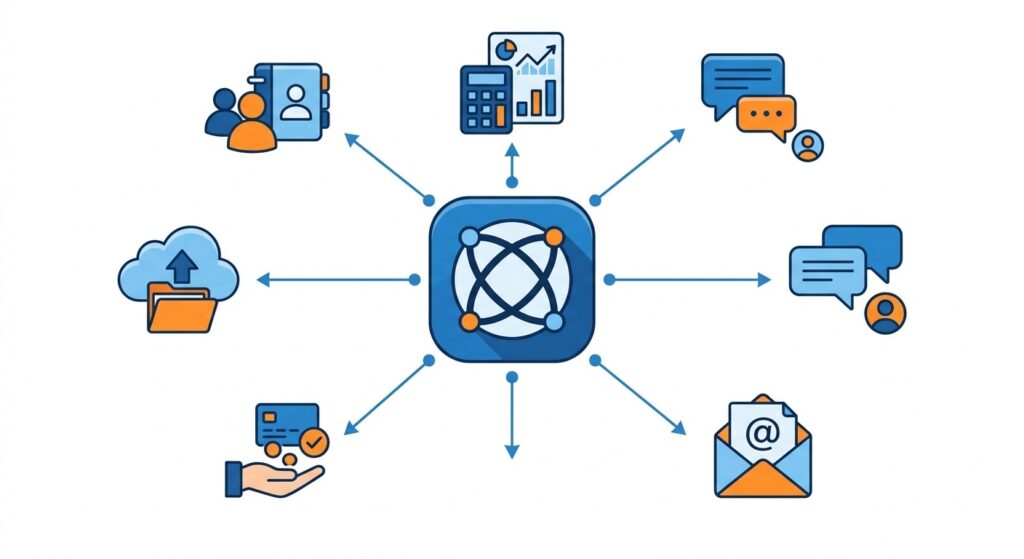
You integrate Zoho Creator in three main ways: native connectors for Zoho apps like CRM and Books, Zoho Flow for no-code automation across 1,000+ apps, and REST APIs or custom connectors for anything else. Most teams start with a native connector or Flow and only use APIs when they need more control.
Your onboarding app rarely lives alone. Sales data sits in a CRM, invoices in an accounting tool, and alerts in chat. Integrations are what keep those systems in step with your Creator app instead of relying on manual copy-and-paste. For a deeper technical look, ZillTech’s Zoho API guide to custom integrations covers the API side in detail.
How does Zoho Flow work with Zoho Creator?
Zoho Flow is Zoho’s no-code integration platform. It watches for an event in one app and then runs actions in another. Zoho Flow’s Creator page says Creator connects with 1,000+ apps.
Creator’s supported Flow building blocks are simple:
- Triggers: record created, record updated, or record created or updated.
- Actions: create record, update record, fetch record, and add a user to a customer portal.
- Extras: webhook triggers, if-then logic, delays, and custom scripting functions.
Zoho’s own popular examples map neatly onto our onboarding app. When a record is added in Creator, Flow can create a contact in Zoho CRM, create an invoice in Zoho Invoice, or send a Slack or Gmail notification. It also works in reverse. Submissions from form tools like Jotform or Typeform can create Creator records automatically.
Plan matters here. On Zoho’s plan comparison page, the built-in Flow integration is included on Enterprise only. Its limits are 600 tasks plus 200 per user per month and 5-minute polling. Standard and Professional users can still use Flow through a separate Zoho Flow account.
What native Zoho integrations are available out of the box?
Creator integrates with the rest of Zoho on all paid plans, plus a set of common third-party services. According to Zoho’s integrations page, the popular ones include:
- Zoho apps: CRM, Books, People, Forms, Desk, Analytics, Recruit, Invoice, Billing, and Sites.
- Accounting and ERP: QuickBooks, plus custom integrations with SAP, Microsoft Dynamics, and others.
- Messaging and payments: Twilio and other SMS services, plus PayPal, Stripe, Razorpay, and Authorize.Net.
- Other: Salesforce, Google Workspace, and Google Calendar.
Typical use cases are lead-to-onboarding (CRM to Creator), invoice generation (Creator to Books or Invoice), and support ticket creation (Creator to Desk).
When should you use REST APIs or custom connectors?
Plan limits shape how far you can push this, per Zoho’s plan comparison:
| Limit | Standard | Professional | Enterprise |
|---|---|---|---|
| Data sources | 5 | 15 | 30 |
| Custom connectors | 5 | 10 | 20 |
| Connections | 10 | 50 | 100 |
| External calls (per user per day) | 100 | 250 | 500 |
| Developer API (per user per day) | 250 | 500 | 1,000 |
| Custom API (per user per day) | 100 | 250 | 500 |
Which integration option should you choose?
| Option | Best for | Skill needed | Watch out for |
|---|---|---|---|
| Native Zoho integration | Connecting Creator to other Zoho apps | Low | Field mapping when your data models differ |
| Zoho Flow | Event-driven automation across many apps | Low to medium | Task caps and 5-minute polling |
| REST APIs / connectors | Non-Zoho systems, custom logic, high volume | Medium to high (Deluge) | Daily API and external-call limits |
If you’d rather not wire these up yourself, this is where a partner earns its fee. ZillTech’s Zoho integration services connect Zoho with QuickBooks, Xero, IntakeQ, and CompanyCam through API connections, using Zapier, Make.com, and Zoho Flow to keep data in sync.
If your data also needs to move from an old system first, add its Zoho migration services to the plan.
Is Zoho Creator secure and compliant for regulated industries?
Zoho Creator supports HIPAA, GDPR, SOC 2, and ISO 27001, but platform certification doesn’t make your app compliant by itself. Zoho secures the platform, and you have to configure your app correctly: label sensitive fields, restrict access, keep audit trails, and vet every integration. Zoho says as much about HIPAA: it provides features to help customers use Creator applications in a HIPAA-compliant manner.
Treat this section as a buyer’s guide, not legal advice. For anything regulated, have your legal advisor confirm what applies to you.
What security certifications and standards does Zoho Creator meet?
According to Zoho’s Creator security FAQ, Creator is compliant with a long list of standards. The ones most buyers ask about are:
- ISO/IEC 27001, 27017, and 27018, plus ISO 9001:2015
- SOC 1 Type II and SOC 2 Type II, and SOC 2 + HIPAA
- CSA STAR
- GDPR, CCPA, and POPIA
- Cyber Essentials Plus and Spain’s ENS
The full list and certificates are on Zoho’s compliance page.
The technical safeguards behind those standards, per the same FAQ:
- Data is encrypted in transit (TLS 1.2/1.3) and at rest (AES-256), and each customer’s data is logically separated from others.
- Full-disk encryption is used at Zoho’s India, Australia, and Europe data centers.
- Zoho runs internal penetration tests every six months, external tests annually, and weekly vulnerability scans, and follows OWASP-based secure development practices.
- Access controls include roles, permission sets, MFA, and SAML single sign-on.
On paid plans, encryption for sensitive fields (PII and ePHI), the audit trail, and MFA are all included. SAML SSO is an add-on on Standard and Professional and included in Enterprise.
How does Zoho Creator support HIPAA and healthcare use cases?
Creator gives you the controls to build a HIPAA-aligned app, and Zoho will sign a Business Associate Agreement (BAA). Zoho’s HIPAA guide says Zoho doesn’t use HIPAA-protected health information for its own purposes, and that you can request its BAA template by emailing its legal team. The features it points to are:
- ePHI labeling: mark a field as “Contains health info (ePHI)” in the form builder.
- Field encryption: add a layer of encryption to those fields.
- Access control: permission sets at module, record, feature, and field level, plus role hierarchies, data sharing rules, and domain restriction.
- Audit trails: record changes are kept for a year and print or export actions for three months. Trails can be exported as CSV, but you’re responsible for retaining the exports.
- Backup and restore: schedule backups of your apps and restore them when needed.
Two boundaries matter. First, these features are available only on paid plans. Second, HIPAA protection applies only to data inside the platform. Once ePHI is sent to an external service through an integration, responsibility passes to that service, so check that any connected tool is HIPAA compliant too.
For a real example, Srikamatchi Medical Centre runs its facility, biomedical, and safety operations on Creator. Its clinical departments use dedicated healthcare systems, so it’s an example of healthcare-adjacent operations, not clinical records.
What about GDPR, data residency, and breach notification?
Creator includes tools for GDPR’s core requirements, and Zoho documents its own breach-notification duties. Zoho’s app security page says Creator supports consent declaration, opt-in and double opt-in, role-based PII, encryption and masking, and data protection impact assessments, and it supports data subjects’ rights to access, correct, and erase their data.
On breaches, Zoho’s FAQ says that as a data controller it notifies the relevant authority within 72 hours, and that as a processor it informs the customer controllers without undue delay. Your own notification obligations still apply to your business.
For residency, Zoho says it operates regional data centers so data can stay in a chosen region. Confirm which region your account is in before you promise residency to a client or regulator.
How do you design a compliance-aware app in Zoho Creator?
Start from the data you collect, then map each requirement to a Creator feature. Use this checklist:
| Requirement | Creator feature to use |
|---|---|
| ✓Know where sensitive data lives | Mark ePHI fields; encrypt PII and confidential fields |
| ✓Limit access to what’s needed | Roles, permission sets, sharing rules, IP restrictions |
| ✓Prove who did what | Audit trail (export and retain it yourself) |
| ✓Recover from loss | Backup and restoreZoho also keeps weekly full and daily incremental backups, retained three months |
| ✓Honor privacy rights (GDPR) | Consent fields, opt-in mechanisms, masking, erasure processes |
| ✓Protect data in integrations | Encrypted connections, plus a check that each vendor is compliant |
| ✓Contractual cover | BAA for HIPAA; a data-processing agreement where GDPR applies (confirm with Zoho) |
| ✓Safe change management | Separate development and production environments; test before release |
The last row echoes Zoho’s own secure-development approach, with separate development, testing, and production environments and reviewed changes. Apply the same discipline to your own apps. Collect only the data you need, and document who owns each retention decision.
Regulated builds are where a partner is worth the cost. ZillTech serves healthcare, insurance, and banking clients and has a Zoho CRM for healthcare practice, and its Zoho consulting team can review your data model, permissions, and integrations before you go live.
How does Zoho Creator compare to Power Apps and Airtable?
| Feature | Zoho Creator Our pick for portals + mobile | Microsoft Power Apps | Airtable |
|---|---|---|---|
| Paid pricing (per user/month, annual billing) | ~$8 Standard (1 app), ~$20 Professional, ~$25 Enterprise | $20 Premium ($12 at 2,000+ seats); pay-as-you-go ~$10 per active user per app | $20 Team, $45 Business (per editor) |
| Free option | Free plan (1 app) and 15-day trial | Developer plan (non-production) | Free plan (5 editors, 1,000 records per base) |
| External users | 3 portal users included; more via add-on | Power Pages, licensed separately | Portals add-on from $120/month for 15 guests |
| Native mobile | Web, iOS, Android from one build | Canvas and model-driven apps | Responsive web interface |
| Best fit | Portals, mobile, workflows, Zoho users | Microsoft 365 and Dataverse shops | Spreadsheet-style internal tools |
Sources: Zoho’s comparison page, Microsoft’s licensing FAQ, and Airtable’s pricing page. One caveat: Zoho’s page is vendor-authored, so its claims are labeled accordingly below.
Zoho Creator vs Power Apps: which should you choose?
Choose Power Apps if your organization runs on Microsoft 365, Azure, and Dataverse. Choose Creator if you want a more self-contained platform and don’t depend on Microsoft.
Pricing. Power Apps Premium is $20 per user per month, matching Creator’s Professional tier. Microsoft’s older per-app plan ($5 per user per app) has been retired for most new customers. Microsoft has also announced a $2 per user price increase for both Premium plans, effective January 1, 2027, so budget for that. Watch add-ons too: Dataverse capacity overage runs about $40 per GB per month.
What Zoho says sets Creator apart (vendor claims): AI features are included on paid plans with usage caps, while Power Apps needs an AI Builder add-on at $500 per unit per month or Copilot Studio from $200 a month. Zoho also says Creator offers iOS and Android SDKs and app rebranding, and that Power Apps leans on Power BI for reporting.
Where Power Apps is stronger. Even Zoho’s own page acknowledges Power Apps’ governance and pipeline-based lifecycle management. Its edge is deep integration with Microsoft 365, Azure, and Dataverse, plus enterprise scale.
Zoho Creator vs Airtable: when is each a better fit?
Airtable wins on simplicity for internal team collaboration, and Creator wins when you need workflows, mobile apps, or external users. Airtable is billed per editor at $20 (Team) or $45 (Business) per month annually. Records are capped per base at 50,000 on Team and 125,000 on Business, per one pricing breakdown.
For external users, Airtable does offer Portals, but as an add-on starting at $120 a month for 15 guests on Team. Creator includes three portal users on paid plans, and an outside-user block starts around $100 a month for 250 users, according to one Zoho consultancy. That difference matters if customers or vendors need logins.
One more factor: Bending Spoons completed its acquisition of Airtable on September 4, 2026. Nothing about pricing has changed publicly, but it’s worth monitoring if you’re committing for a year.
What are real-world examples and results from using Zoho Creator?
Organizations use Zoho Creator to replace paper and spreadsheets with mobile, automated workflows, and several report large savings. Srikamatchi Medical Centre, a hospital in India, reports about a 40% workforce productivity improvement and roughly ₹400,000 saved each month after digitizing its facility operations. Every figure below is vendor-published or customer-reported, not independently audited.
How did Srikamatchi Medical Centre use Zoho Creator?
Srikamatchi is a 300-bed hospital in Thanjavur, Tamil Nadu, established in 2022. Its engineering, biomedical, facility, and safety teams were working from paper registers, per Zoho’s case study. Technicians would finish maintenance work, return to their desks, and update paperwork, and supervisors couldn’t easily verify what had been done.
Instead of one app, the hospital built a suite covering asset management, preventive maintenance, calibration, fire and safety, utility monitoring, and document management. Two design choices stand out:
- QR codes on every asset, linking to its purchase details, maintenance schedule, calibration records, and breakdown history.
- IoT integration that pushes readings for temperature, electricity, generators, water, and medical gases straight into Creator. The hospital says this generates nearly 40% of the department’s documentation automatically.
The reported results:
- Time: technicians spent up to four hours of an eight-hour shift on registers, and now save 2 to 3 hours a day.
- Energy: real-time monitoring cut daily electricity use from about 12,000 kWh to about 10,000 kWh, which the hospital values at around ₹400,000 a month.
- Productivity: the hospital estimates a roughly 40% increase in workforce productivity, and describes the facility department as zero-paper.
Two caveats. The 40% productivity figure is the hospital’s own estimate, and it’s separate from the “nearly 40%” of documentation that is automated. Also, this covers non-clinical operations: Srikamatchi’s clinical departments use dedicated healthcare systems.
What other enterprise results are publicly reported?
| Organization | What they built | Reported outcome |
|---|---|---|
| Somany Impresa GroupManufacturing, India | 50+ apps in a year and 200+ digital shop-floor logbooks, synced with SAP | 90% reduction in development time |
| ITV StudiosMedia | Platform replacing thousands of disconnected spreadsheets | Live in six weeks, 400+ users across 13 countries and 60 production labels |
| BigBasketRetail | Procurement work on Creator | Almost ₹3 crores (about $360K USD) saved in six months, per its head of procurement on Zoho’s customers page |
| Hindu Tamil ThisaiPublishing | Low-code publishing workflows | 40% lower IT costs, per Zoho’s India case-study listing |
Somany’s CIO also describes a policy worth noting. He wants his SAP core kept clean and plans to build any customization in Creator instead. In his words, the group was “a big SAP shop” whose pro-code SAP instances made new requirements slow to build.
What common patterns do successful implementations share?
Across these examples, the same habits keep appearing:
- Mobile-first for people who aren’t at a desk. Srikamatchi’s technicians and Somany’s shop-floor logbooks both capture data where the work happens.
- Extend core systems instead of replacing them. Somany’s logbook data feeds SAP production planning, and approved prices sync to SAP in real time.
- Automate data capture. QR codes and IoT feeds cut manual entry at Srikamatchi.
- Start with a painful, specific process. Contractor expenses, price approvals, and facility logs were all concrete.
- Control access. Somany used IP-based restrictions so certain forms are reachable only from specific IP ranges.
- Plan for life after launch. Zoho’s own guide to application lifecycle management (ALM) argues that most apps fail after development, when nobody owns maintenance, compliance, or retirement. It recommends regular reviews, such as quarterly retrospectives. The next section covers this.
If you want partner-led examples of spreadsheet-to-system projects, ZillTech publishes its own case studies, including a unified sales pipeline for an equipment company and a four-branch veterinary clinic. Those use other Zoho apps such as CRM, so they aren’t Creator-specific. If you have a similar process to digitize, ZillTech’s Zoho implementation services are a practical starting point.
What are the limits and governance considerations for scaling Zoho Creator?
As you scale, plan for four things: plan-based usage limits on records, storage, emails, and API calls; portal user costs; the fact that Creator’s servers scale automatically while your plan quotas don’t; and an application lifecycle process that keeps changes safe. Most scaling problems come from limits and change control, not from the platform running out of capacity.
What usage limits should you monitor as you grow?
| Limit | Standard | Professional | Enterprise |
|---|---|---|---|
| Records per user | 25,000 | 100,000 | 250,000 |
| Storage per user | 1 GB | 3 GB | 5 GB |
| Emails per user per day | 100 | 250 | 500 |
| Deluge execution statements | 10,000 | 20,000 | 50,000 |
| Cloud function calls per user per day | 50max 5,000/day | 100max 10,000/day | 200max 20,000/day |
| Developer API calls per user per day | 250 | 500 | 1,000 |
| Portal permission sets per app | 10 | 50 | 250 |
Apps: Standard allows one app, so a second build means upgrading.
Portal users: paid plans include three, and additional external users are an add-on.
Roles and permission sets: roles are capped at 50, 200, or 1,000 per app, and permission sets follow the table above. A portal with many user types can hit those limits before it hits a record limit.
Zoho’s help center also says the record limit applies to the total across your account, and that development and stage environments get an extra 20% allowance. Treat the per-user figures as a guide and confirm how they pool for your account. Put a monthly check on your calendar for record counts, email volume, and API usage before they become outages.
How does Zoho Creator handle performance and concurrency?
Zoho says there are no restrictions on concurrent usage and that the platform auto-scales. According to its security and infrastructure FAQ, Creator scales horizontally by adding front-end servers and vertically as memory, data size, and CPU approach thresholds. It also uses an independent asynchronous scheduler engine for non-interactive actions and large batch jobs.
In practice, that means your ceiling is your plan’s quotas, not Zoho’s servers. That is a vendor description, so load-test any high-volume workflow before go-live. For heavy batch work, use batch blocks and schedules instead of one large synchronous script.
What is ALM and why does it matter for Zoho Creator?
Application lifecycle management (ALM) covers an app’s whole life: requirements, development, testing, deployment, maintenance, and retirement. Zoho’s ALM guide makes the case that most applications fail after development, when nobody owns maintenance, compliance, or retirement.
It differs from the software development lifecycle (SDLC) in scope. SDLC covers how software is built, while ALM adds governance, compliance tracking, operations, and retirement planning. Zoho’s implementation advice includes:
- Start from the outcomes you need, then choose processes and tools.
- Define roles and handoff criteria across every team.
- Standardize how changes are managed and releases approved.
- Automate repetitive steps.
- Hold retrospectives on a regular cycle, such as quarterly.
This is what separates a governed low-code program from “shadow IT” sprawl. Without it, dozens of citizen-built apps end up with no owner and no documentation.
How should you structure environments and change management?
Development
The only place edits happen.
Stage
Where you test changes before release.
Production
The live app your users see.
Changes flow strictly from development to stage to production. Data does not travel with them. Data stored in an environment stays in that environment, so test with realistic sample data in stage.
Zoho also notes that only super admins, admins, and developers with environment permissions can publish, and that up to three applications can be published to stage at a time.
Here is a simple pipeline to adopt:
| Stage | Who | Gate to move forward |
|---|---|---|
| Development | Builders | Change is documented and self-tested |
| Stage | Testers and process owner | Role-based test cases pass; approvals and workflows fire correctly |
| Production | Admin with environment permission | Sign-off recorded; backup taken; rollback plan agreed |
| Quarterly review | Process owner and IT | Retire, fix, or expand the app |
Add role separation (builders shouldn’t approve their own releases), documentation standards, and a rollback plan built on Creator’s backup and restore feature. Environments are available on paid plans, not Free.
Governance is often where a partner adds the most value. ZillTech’s Zoho consulting services analyze your processes and build a roadmap for your Zoho apps, and its implementation services include team training and a post-launch support period, so ownership doesn’t disappear at handover. It says ongoing support beyond that period is a separate arrangement.
Frequently Asked Questions
Is Zoho Creator free?
Yes, Zoho Creator has a free plan and a 15-day free trial of the paid plans. The free plan covers one app and 250 MB of storage, and Zoho’s plan-comparison page lists 5,000 records. It’s enough to test an idea, but it can’t share apps with other users and excludes features like Blueprint.
How much does Zoho Creator cost per user in 2026?
As of September 2026, paid plans cost about $8 (Standard), $20 (Professional), and $25 (Enterprise) per user per month when billed annually, per Zoho’s own comparison. Monthly billing costs more. Standard is limited to one app, so most teams building more than one app need Professional. Portal users, support plans, and some add-ons cost extra.
Is Zoho Creator easy to learn for non-developers?
Largely yes, for the core work. You can build forms, reports, dashboards, and basic workflows with drag-and-drop tools and no code. Custom logic requires Deluge, Zoho’s scripting language, which has a learning curve. A good approach is to start with one small pilot app and add scripting only where a workflow needs it. If you’d rather not learn it yourself, a partner can build the complex parts, such as ZillTech’s Zoho customization and automation team.
Can I use Zoho Creator without other Zoho apps?
Yes. Creator works as a standalone platform, and you can connect it to non-Zoho tools through APIs, custom connectors, and Zoho Flow. Zoho lists integrations with tools like QuickBooks, Salesforce, Google Workspace, and payment services, and one customer, Somany Impresa Group, uses it alongside SAP. The trade-off is that native integration is smoothest inside the Zoho suite, so a Zoho-heavy business gets more from Creator.
How do I integrate Zoho Creator with Zoho CRM or other tools?
Use the native Zoho integration for Zoho apps, Zoho Flow for no-code automation across 1,000+ apps, or REST APIs for custom needs. For example, a Flow can create a Zoho CRM contact every time a record is added to a Creator form. Note that the built-in Flow integration is included on Enterprise only. If you want help wiring systems together, see ZillTech’s Zoho integration services.
Is Zoho Creator HIPAA compliant?
Zoho Creator provides features to help you build HIPAA-aligned apps, and Zoho will sign a Business Associate Agreement, but using Creator doesn’t make an app compliant by itself. Its HIPAA guide points to ePHI field labeling, field encryption, granular permissions, audit trails, and backups. These features are available on paid plans only, and you’re responsible for configuring them correctly and vetting any integrations that receive health data. Confirm your obligations with your legal advisor.
What is Deluge scripting in Zoho Creator?
Deluge is Zoho’s scripting language for adding custom logic to Creator apps. You use it in workflows, custom functions, approval actions, Blueprint transitions, and scheduled jobs, for tasks like setting a status, calculating dates, or routing approvals dynamically. Zoho’s Deluge guide covers the syntax and how to automate workflows with scripts. Plan limits cap how many statements you can run, ranging from 5,000 on Free to 50,000 on Enterprise.
Can I build offline mobile apps with Zoho Creator?
Yes. The Zoho Creator mobile app supports offline access on iOS and Android for forms and reports you mark as offline components, on all plans. Records submitted offline sync when the device reconnects, and offline components auto-sync every 24 hours, per Zoho’s offline access documentation. Forms with certain features, such as dependent formula fields, integration fields, or on-load workflows, can’t be used offline, so test your design before promising it to field teams.
What should you do next if you want to start using Zoho Creator?
Pick one high-impact process, map its data and workflow, build a small pilot app, test it with real users, and iterate before you scale. A pilot keeps risk and cost low, and it shows you whether Creator’s limits and pricing fit before you commit a whole team.
How can you start with a small, low-risk pilot?
| Week | Focus | Output |
|---|---|---|
| Week 1 | Plan | Problem statement, users, data list, approvals, and permissions (use the planning checklist from the build section) |
| Week 2 | Build | Forms, relationships, one or two reports, one dashboard |
| Week 3 | Automate and secure | Workflows, one approval, roles and permissions, first mobile test |
| Week 4 | Test and decide | Real users run real cases in stage; record what breaks; decide whether to expand |
You have three ways to begin, and you can switch between them. According to Zoho’s free app builder page, you can describe the app to Zoho’s AI agents, import existing data from spreadsheets, CSV, JSON, XML, or a SQL database, or build manually with drag-and-drop.
It also says the free trial needs no credit card, your account moves to the Free plan afterward, and everything you build carries over when you upgrade. The Free plan offers one app, 5,000 records, and 250 API calls a day.
Depending on who you are, start here:
Ops manager
Document the process end to end and choose the one metric the app should improve.
IT admin
Check permissions, integrations, and compliance needs before building.
Founder
Start with a template or the Free plan, and don’t pay for licences until the pilot proves value.
What skills or roles do you need on your team?
You need three roles, not a development department:
- A process owner who knows how the work really happens and signs off on the design.
- A citizen developer who builds and maintains the app in Creator.
- Light IT oversight for access control, integrations, and the release process covered in the governance section.
Bring in a partner when the situation gets complex, for example:
- Several teams share one app.
- The data model spans many related forms.
- You depend on integrations with CRM, finance, or analytics tools.
- You work in a regulated industry.
ZillTech is one option. Its team of Zoho consultants offers implementation, consulting, customization and automation, integration, migration, and analytics and reporting services. Its site says projects typically take two to six weeks, licences are paid directly to Zoho, implementation is quoted as a fixed scope, and the first consultation is free with no obligation. It also says most clients start with a single app and expand in phases, which matches the pilot approach above.
If you’d like a second opinion on your pilot’s scope, you can book a free Zoho consultation with ZillTech or contact the team.
Where can you find templates, tutorials, and support?
Start with Zoho’s own resources, then add community and partner help as you grow:
- Templates: Zoho says it has 50+ prebuilt app templates for common use cases, so you don’t have to start from a blank page.
- Documentation and tutorials: Zoho’s help center covers each feature, including Deluge and the mobile and environments features discussed above. Third-party tutorials, such as Brockbank Consulting’s, offer a practical structure to follow.
- Support: Classic support is free on paid plans. Premium and Enterprise support cost 20% and 25% of your license fee, and Zoho also offers a guided Jumpstart program for teams that want it to handle app development from ideation to delivery.
- Partners: consultants like ZillTech can take on the parts you’d rather not build yourself.
The next step is small. Choose your one process this week, write down its users, data, and approvals, and start a free trial to test it. If the pilot works, you’ll have the evidence to scale it with confidence. When your application needs to connect with external platforms, Zoho API documentation can help you understand authentication, API requests, and custom integrations. This makes it easier to extend your application’s functionality.