
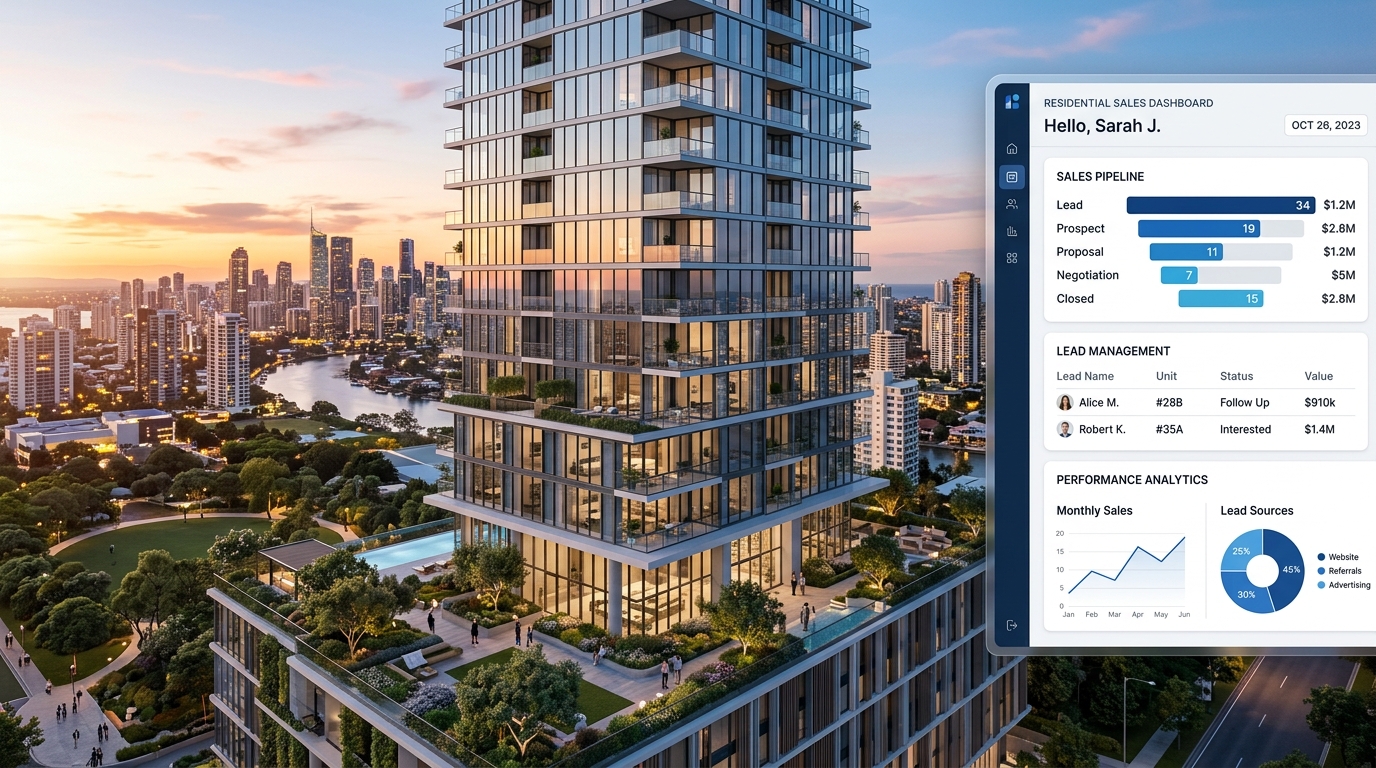
I’ve set up Zoho CRM for enough real estate developers now to notice the same pattern every time. The first project sells out fast, everyone’s thrilled, and then somewhere around project two or three, things start slipping through the cracks. A unit gets double-booked. A milestone payment gets missed. A broker calls asking where their commission went. None of that is a sales problem. It’s a systems problem, and it’s exactly what a properly built CRM is supposed to prevent.
Build a Zoho CRM That Matches How Your Real Estate Business Actually Works
From inventory and lead management to payment schedules, broker commissions, and post-sales workflows, we design Zoho CRM systems tailored to real estate developers, not generic sales teams.
Book a Free Zoho CRM Consultation
If you’re a developer evaluating a CRM for real estate developers, here’s the short version: it needs to track your inventory down to the individual unit, tie payments to construction milestones, manage your sales pipeline stage by stage, and keep brokers, buyers, and legal documentation all in one place instead of scattered across spreadsheets and email threads. Everything below is what I look for when I build one, and what I’d tell you to ask for if someone else is building yours, it’s the same standard we hold every Zoho CRM setup to at ZillTech, real estate or otherwise.
Here’s the full list at a glance before I walk through each one:
| Feature | What It Solves | Where It Lives in Zoho |
| Project → tower → unit hierarchy | Inaccurate or outdated inventory visibility | Zoho CRM modules + custom layouts |
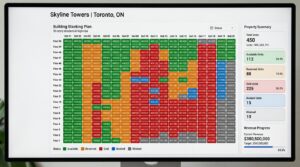
| Live stacking plan | Sales reps can’t show real-time availability | Zoho CRM + custom UI extension |
| Milestone-based payments | Manual payment tracking, missed due dates | Zoho CRM + Zoho Books integration |
| Requirement-based lead capture | Leads with no buyer context, poor matching | Zoho CRM lead layouts + automation |
| Stage-gated sales pipeline | Deals skipping required steps or approvals | Zoho CRM Blueprint |
| Auto-generated documents | Manual paperwork, version errors | Zoho CRM + Zoho Writer/Sign |
| Broker & attorney management | Commission disputes, scattered legal status | Zoho CRM custom modules |
| Third-party integrations | Disconnected accounting, e-sign, portals | Zoho Flow / Zoho CRM API |
| Mobile access | Site-visit leads going cold before entry | Zoho CRM mobile app |
| Post-sale campaigns | Buyers going quiet after signing | Zoho Campaigns / Zoho CRM |
Why Spreadsheets Stop Working Somewhere Around Project Two
One project is manageable with a shared spreadsheet and a group chat. I get it — it feels like overkill to set up a whole CRM for that. But the moment you’re running two projects, three sales teams, or a broker network on top of your direct sales, the spreadsheet model falls apart fast. Inventory updates lag behind what’s actually happening on the ground. Finance is chasing payment confirmations manually. Legal is waiting on booking forms nobody remembers to send. None of these are individually dramatic, but they add up to lost deals and frustrated buyers, and that’s the point where I usually get the call.
| Task | Manual / Spreadsheet Approach | With a CRM in Place |
| Checking unit availability | Call or message the sales team, hope it’s current | Real-time status visible to everyone instantly |
| Tracking milestone payments | Finance manually cross-checks bank statements | Automated reminders and overdue flags |
| Assigning a new lead | Manually forwarded by email or WhatsApp | Auto-assigned based on buyer profile and rep availability |
| Generating a booking form | Typed manually from notes, prone to errors | Auto-populated from the deal record |
| Tracking broker commissions | Separate spreadsheet, reconciled monthly | Tied to the deal automatically, always current |
Here’s what actually needs to be in place to avoid that. And if you’re already past spreadsheets entirely and looking to move off a legacy system, I put together a complete Zoho CRM migration guide that walks through how to do that without losing a single record.
1. Inventory That Mirrors Your Actual Project Structure
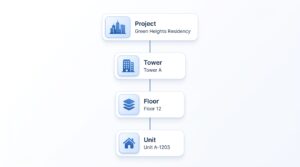
Your inventory isn’t a flat list. It’s a hierarchy, projects contain towers, towers contain floors, floors contain units — and your CRM needs to reflect that exactly, not approximate it. I always build this in three layers:
Project level, for tracking launch dates, construction status, total units, and units sold vs. available — the numbers your leadership team pulls up before a strategy meeting. Tower or building level, so you can see that Tower B is moving twice as fast as Tower A because of the view, and adjust pricing or promotion accordingly.
Unit level, where every single unit is its own record with configuration, carpet area, floor, facing direction, price, and live status.
The unit level is where most of the value is. When a unit’s status updates the second it’s blocked or sold, you stop double-committing inventory, and your sales team can negotiate with actual confidence instead of hoping the spreadsheet is current.
2. A Stacking Plan Your Sales Team Can Actually Use Live
Buyers don’t think in unit numbers. They think in floors, views, and layouts. A stacking plan gives your CRM a visual map of the building that updates in real time as units get blocked, booked, or sold. I’ve watched sales reps close deals faster just because they could pull up a floor plan mid-conversation and say “this one, on the 9th floor, is still open” instead of scrolling through a spreadsheet while the buyer waits. When availability is visual and current, buyers trust what they’re being told, and trust is what actually moves a negotiation forward.
3. Payment Schedules Tied to Construction Milestones
Most development projects run on construction-linked or milestone-based payment plans, and tracking those manually is a genuine financial risk — not just an inconvenience. I set this up so every deal record carries its own payment schedule mapped to specific construction stages, with automated reminders before due dates and clear flags on anything overdue. Once this is automated, your finance team stops chasing people for updates and starts working from real numbers, and your revenue forecasting actually holds up.
4. Lead Capture That Builds a Real Buyer Profile
A name and phone number isn’t a lead — not in this business. With leads coming in from portals, ads, events, and broker referrals, your CRM needs to capture what actually matters: budget range, preferred configuration, whether they’re buying to invest or to live in, their expected timeline, and where the lead came from. I set up automated assignment rules so leads land with the right sales rep immediately, based on that profile, instead of sitting in a queue. The better the intake, the easier it is to match buyers to the right unit on the first call.
5. A Sales Pipeline That Enforces Its Own Rules
Every deal follows roughly the same path — site visit, negotiation, booking amount received, agreement signed — and I build this as a formal pipeline in Zoho using Blueprint, which is Zoho’s tool for stage-gated workflows. That kind of custom workflow logic is exactly what falls under our Zoho Customization & Automation work. The point isn’t just organization. It’s that a deal literally can’t skip a required document or approval and move to the next stage. That single guardrail eliminates most of the “wait, did we ever get that signed?” conversations that slow legal and finance down. If you want to see how a pipeline like this gets built from the ground up, I walked through the full process in our CRM implementation guide.
6. Documents That Generate Themselves From the Deal Record
Every booking generates a stack of paperwork — booking forms, cost sheets, sale agreements, receipts — and doing that by hand is where typos and version confusion creep in. I set this up so documents pull directly from the deal record: buyer details, unit info, pricing, and payment schedule auto-populate instead of getting retyped. If you’re curious how the intake side of this works, I covered building those forms in our guide to Zoho Forms. Everything gets stored against that deal, with role-based access, so nobody’s ever digging through email for “the latest version” of a contract.
7. Broker and Attorney Management Inside the Same System
If your brokers and legal counsel are being tracked outside the CRM, in someone’s inbox or a separate spreadsheet, you’re setting yourself up for commission disputes and legal delays. I keep this all inside the CRM — which broker is linked to which deal, what their commission structure is, when payouts are due, and where legal documentation stands with your attorneys. When it’s all visible in one place, disputes go down and everyone stops relying on memory or old email threads to settle disagreements.
8.Integrations That Connect the CRM to the Rest of Your Stack
This is the piece I see missed most often in generic CRM setups. Your CRM shouldn’t be an island. I typically connect Zoho CRM to accounting tools like Zoho Books or QuickBooks so payment data flows both directions, e-signature tools so agreements get signed without leaving the platform, and WhatsApp or property portal integrations so leads and updates don’t require manual re-entry this is exactly what our Zoho Integration Services cover. For teams that need something a standard connector can’t handle, I also wrote about building custom integrations with the Zoho API. Every manual handoff between systems is a place where data goes stale or gets lost integrations close those gaps For businesses that need more than standard connectors, custom API integrations can help connect Zoho CRM with specialized platforms, automate data exchange, and support complex workflows. Learn more about building custom integrations with Zoho API in our complete technical guide
9. Mobile Access for Your On-Site Sales Team
Your sales team isn’t sitting at a desk. They’re doing site visits, standing in show flats, meeting buyers on weekends. If they can’t pull up live inventory and log a lead from their phone right after a walkthrough, that lead cools off before it ever hits the system. I make sure the mobile app is part of the rollout from day one, not an afterthought, it’s often the single biggest factor in whether a team actually adopts the CRM or quietly goes back to notebooks and texts.
10. Post-Sale Communication That Keeps Buyers Engaged
The sale closing isn’t the end of the relationship. it’s the start of the part that generates referrals and repeat buyers. I set up segmented campaigns for construction updates and payment reminders, tailored by project, unit type, or whether the buyer is an investor or an end-user. Automated, well-timed updates keep buyers feeling informed instead of ignored, and a buyer who feels taken care of after signing is far more likely to refer a friend or come back for your next launch.
What Setting This Up Actually Looks Like
None of this happens overnight, and I’d be skeptical of anyone who tells you it does. In my experience, a real estate developer CRM build, the kind we handle under Zoho Implementation & Setup — typically runs in phases:
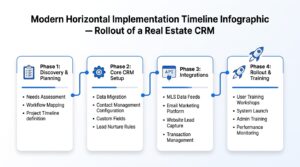
- Discovery — mapping your actual sales process, payment structures, and team roles (usually 1-2 weeks)
- Core setup — inventory hierarchy, pipeline stages, and document templates (2-4 weeks)
- Integrations — connecting accounting, e-signature, and communication tools 4. Team rollout and training — this is the phase people underestimate, and it’s often the difference between a CRM that gets used and one that gets abandoned in month two
The exact timeline depends on how many projects you’re managing and how much of your process is already documented versus living in someone’s head. But the phases themselves don’t really change — it’s roughly the same rollout structure we used on a recent CRM overhaul for a lending company, just adapted to a different pipeline.
The Bottom Line
A CRM for real estate developers isn’t a nice-to-have once you’re running more than one project at a time, it’s what keeps sales, finance, and legal moving in sync instead of tripping over each other. The features matter, but so does how it’s actually built and rolled out to your team. That second part is where most of the real risk sits, and it’s the part I spend the most time on with every developer I work with.
If you’re evaluating a CRM setup for your next project, I’m happy to walk through what that would look like for your specific process. Schedule a free consultation , or contact us directly and we’ll figure it out together.





