Business Process Automation with Zoho: A Smarter Way to Run Your Operations

usiness Process Automation
Business process automation (BPA) replaces manual, repetitive tasks with smart, rule-based workflows. It helps companies save time, reduce errors, and free up teams to focus on higher-value work. When paired with a platform like Zoho, automation becomes even more powerful and easier to manage.

What Is Business Process Automation?

Business process automation is the use of technology to perform recurring business tasks with little or no human intervention. Instead of employees manually entering data, sending follow-up emails, or updating records, automated workflows handle these tasks instantly and consistently.

BPA typically covers tasks such as:

  • Lead assignment and follow-up
  • Invoice generation and approval
  • Customer onboarding sequences
  • Internal approval chains
  • Data syncing between apps

The goal is to remove bottlenecks so teams can spend less time on admin work and more time on strategic priorities.

Why Business Process Automation Matters

Manual processes might work fine when a company is small, but they quickly become a liability as operations grow. Automation solves this by making processes faster, more accurate, and easier to scale.

Common signs that a business needs automation include:

  • Employees spend hours on repetitive data entry
  • Frequent human errors in approvals or records
  • Delayed responses to customer inquiries
  • Difficulty tracking task ownership and deadlines
  • Data scattered across disconnected tools

Automating these processes doesn’t just save time; it creates a more reliable, predictable operation that customers and employees can trust.

How Zoho Powers Business Process Automation

Zoho One offers a complete suite of automation tools that allow businesses to design workflows around their exact operations, not the other way around. Rather than forcing teams to adapt to rigid software, Zoho’s automation features adapt to how the business actually works.

Deluge Scripting

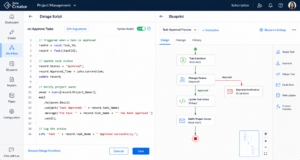
Deluge is Zoho’s built-in scripting language for automating workflows, validating data, and triggering custom actions. It allows for highly specific automation that goes beyond simple if-this-then-that rules.

Blueprint Automation

Blueprint creates structured, rule-based workflows that guide a process from start to finish. This ensures every team member follows the same steps, improving consistency and accountability across departments.

Workflow Rules & Webhooks

Workflow rules trigger actions automatically based on specific conditions, while webhooks allow Zoho to communicate instantly with other apps. Together, they keep data synchronized and processes moving without manual follow-up.

Custom Modules & Canvas Forms

Custom modules extend Zoho CRM to match unique business needs, while Canvas forms simplify how data is entered and viewed. Both reduce friction for teams using the system daily.

Key Benefits of Business Process Automation

When implemented correctly, automation delivers measurable improvements across the organization.

Key Benefit Operational Business Impact
Reduced Manual Errors Replaces human data entry with rule-based workflows to ensure perfect data consistency.
Faster Turnaround Times Accelerates internal approval chains, invoice routing, and customer follow-ups.
Improved Data Accuracy Syncs data automatically across disconnected tools, eliminating silos.
Lower Operational Costs Frees up teams from repetitive admin tasks, lowering overall overhead.
Enhanced Customer Experience Delivers instant, predictable automated responses to inquiries and onboarding sequences.
Increased Accountability Provides clear task ownership and tracking across every automated stage.

These benefits compound over time, often leading to noticeable productivity gains within the first few months of implementation.

Common Business Processes That Can Be Automated


Almost every department can benefit from automation. Some of the most common use cases include:

  • Sales: Automated lead scoring, assignment, and follow-up reminders
  • Marketing: Triggered email campaigns based on customer behavior
  • Finance: Automated invoice approvals and payment reminders
  • HR: Streamlined onboarding checklists and document collection
  • Customer Support: Automatic ticket routing and escalation rules

Each of these processes, when automated, reduces the workload on staff while improving speed and accuracy.

Steps to Successfully Automate Business Processes

Automation works best when it’s planned carefully rather than applied randomly. A structured approach typically looks like this:

  1. Identify repetitive tasks that consume significant employee time
  2. Map out the current process step by step
  3. Determine which steps can be automated without losing quality control
  4. Build and test the automation in a controlled environment
  5. Train teams on the new workflow
  6. Monitor performance and refine as needed

Skipping any of these steps, especially testing and training, is one of the most common reasons automation projects fail to deliver results.

Choosing the Right Automation Partner

Not every business has the in-house expertise to design and implement complex automation workflows. This is where working with a certified consulting partner makes a measurable difference.

When evaluating an automation partner, consider:

  • Platform certification: Are they verified experts on the platform you use?
  • Experience across industries: Have they solved similar problems before?
  • Client feedback: Do real clients report strong results?
  • Ongoing support: Will they help after the initial setup?

Our company, operating since 2018 as a Certified Zoho Partner, brings years of hands-on experience designing Deluge scripts, Blueprint workflows, and custom modules across industries like manufacturing, logistics, healthcare, and consulting. A consistent 4.8/5 client rating further reflects dependable delivery and long-term client trust, both important indicators when choosing who will manage critical business workflows.

Industries That Benefit Most from Automation

While automation helps nearly every business, certain industries see especially strong results:

  • Manufacturing: Production tracking and inventory automation
  • Transportation & Logistics: Shipment updates and route automation
  • Banking & Insurance: Compliance workflows and document automation
  • Healthcare: Patient record updates and appointment reminders
  • Consulting Firms: Client onboarding and project tracking automation

Customized automation, rather than generic templates, tends to produce the best long-term outcomes for these industries.

Conclusion:

Business process automation transforms how companies operate by removing repetitive manual work and replacing it with reliable, rule-based workflows. With tools like Zoho’s Deluge scripting, Blueprint automation, and custom modules, businesses can design systems that truly match their operations. Partnering with an experienced, certified provider ensures automation is implemented correctly the first time, saving both time and resources while supporting long-term growth.

Ready to Automate Your Business Workflows?


Schedule a Free Consultation

Frequently Asked Questions (FAQs)

1. What is the difference between business process automation and software implementation?

Ans: Software implementation involves setting up a system, while business process automation focuses specifically on designing workflows that automatically handle repetitive tasks within that system.

2. How long does it take to automate a business process?

Ans: Timelines vary based on complexity. Simple workflow automations may take a few days, while custom Blueprint processes or multi-app integrations can take several weeks to design, test, and deploy properly.

3. Do I need coding knowledge to use Zoho automation tools?

Ans: Not necessarily. Many Zoho automation features, like workflow rules and Blueprint, are designed for non-technical users. However, advanced automation using Deluge scripting typically requires expertise from a certified specialist.

Tags

What do you think?

Leave a Reply

Your email address will not be published. Required fields are marked *

Related articles

Contact us

Partner with Us for
Smarter IT Solutions

We make technology simple, efficient, and customize to your business. Whether you’re exploring new solutions or need expert support, we’re only a message away.

Your benefits:
What happens next?
1

Once you Submit the form

2

Our team will review your request

3

We get back to you within 24 hours

Schedule a Free Consultation