
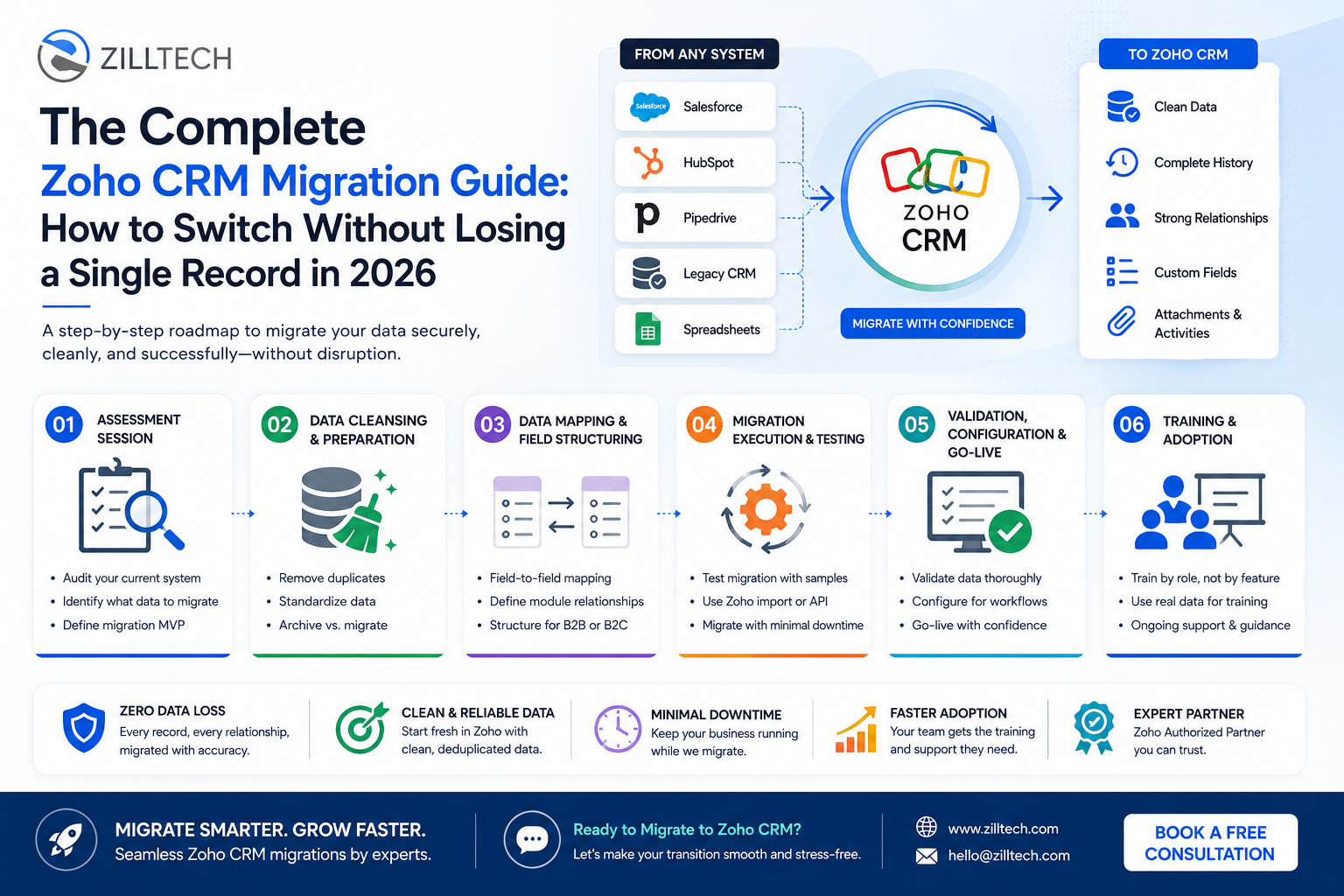
I have seen it happen too many times. A company rushes the migration, dumps messy data into Zoho, and spends the next six months untangling the chaos. Duplicate contacts, broken field mappings, lost deal histories, and a sales team that does not trust the new system because the old data looks wrong.
This is the Zoho CRM migration guide ZillTech uses to move businesses from platforms like Salesforce, HubSpot, Pipedrive, and even legacy spreadsheets into a clean, fully functional Zoho environment. No shortcuts. No jargon. Just a clear roadmap for 2026.
⚠️ Migrating Soon? Avoid the Hidden Data Pitfalls!
Before you press export, discover how to protect your records, map custom pipelines correctly, and prevent a post-migration cleanup nightmare.
Ready to move your data without the downtime? Explore our Zoho Migration Services to see how we ensure a seamless, data-secure transition for your business.
Phase 1: The Assessment Session (Do Not Skip This)
Before you touch a single export button, lock in the most important question: What does your current data actually look like?
Most migrations fail not because of technical problems but because businesses do not know what they have before they try to move it. Sales teams have been logging contacts in three different ways. The old CRM has fields nobody has used in two years. Deals from 2019 are still marked “open.”
Start by auditing your current system. Map out every module you use—Contacts, Accounts, Deals, Activities, Custom Fields—and ask a simple question for each one: Is this data clean, and do we still need it? If you are moving away from older local structures or a mismatch of scattered files, starting with a comprehensive approach helps. To understand the wider journey of moving to Zoho, check out our complete Zoho CRM implementation roadmap.
This is also the time to identify your migration MVP. Not everything needs to come over on day one. Historical closed deals from five years ago? Maybe later. Active pipeline and current contacts? Absolutely on day one. For businesses transitioning from outdated applications, a step-by-step transition roadmap for migrating from legacy systems to the Zoho ecosystem is critical.
If you try to migrate everything at once without a plan, you end up with a bloated, messy Zoho CRM that feels worse than what you left behind.
Data Migration Priority Hierarchy
100%
80%
35%
We recommend leaving cold, archived historical records for secondary imports or offline storage.
Phase 2: Data Cleansing and Preparation (The Unglamorous Truth)
This phase is the one people skip. It is also the reason most migrations go wrong.
Before any data leaves your old system, you need to clean it. That means:
- Deduplication: Run a duplicate check across your contacts and accounts. Most CRMs accumulate hundreds of duplicate records over the years. Bringing those into Zoho doubles your problem.
- Standardization: If your “Lead Source” field has entries like “Web,” “website,” “Website Form,” and “online form,” you have four values that mean the same thing. Pick one standard and fix the rest before migration. Once inside Zoho, inconsistent data becomes a reporting nightmare.
- Archiving vs. Migrating: Not all data needs to move. Inactive records from several years ago can be archived or exported to a backup file. Bringing only relevant, active data keeps your new Zoho environment fast and manageable. We highlight these issues in detail in our deep-dive on why most Zoho migrations fail.
ZillTech’s process involves cleaning data before it ever reaches Zoho. The golden rule here is simple: garbage in, garbage out. Cleaning data properly is the precursor to modern extraction practices. Learn how to manage details programmatically with Zoho ETL and data cleansing tools.
Click here to let our services help you audit and clean your data before you ever hit the import button, ensuring your new Zoho environment is built on a solid foundation.
Phase 3: Data Mapping and Field Structuring (The Architecture Work)
Now you are ready to build the bridge between your old system and Zoho. This is where data mapping comes in, and it is more nuanced than it looks.
- Field-to-Field Mapping: Every field in your old CRM needs a corresponding field in Zoho. Sometimes the match is obvious—”First Name” maps to “First Name.” Sometimes it is not—a custom field in Salesforce called “Opportunity Score” might map to a custom field you need to create inside Zoho CRM first. If you are debating between systems, check out our Zoho CRM vs. Salesforce comparison.
- Module Relationships: In Zoho, Contacts are linked to Accounts, Deals are linked to Contacts, and Activities are tied to all three. If your old system stored relationships differently, this mapping needs to be defined explicitly. Get this wrong, and you will have orphaned records with no connections.
- B2B vs. B2C Structure: This is the same decision that matters in implementation. If you are a B2B company, your data structure in Zoho should center on Accounts with Contacts attached to them. If you are B2C, Contacts become the hub. Map your incoming data accordingly before you run a single import.
ZillTech handles this mapping step as a formal document—a field mapping spreadsheet that both sides review and approve before migration begins. No assumptions. This structural accuracy is what makes custom app integration easier down the line. If you plan to extend these configurations later, view our guide on building custom business apps with Zoho Creator.
Phase 4: Migration Execution and Testing (The Actual Move)
With clean data and a confirmed field map, you are ready to migrate. But you do not start with all 50,000 records on day one.
Test Migration First: Export a sample of 50 to 100 records and run them through the import process. Check every field. Verify that relationships are intact. Confirm that custom fields populated correctly. This test run almost always reveals at least one mapping issue you did not anticipate—and it is much easier to fix with 50 records than with 50,000. For real-world reference, explore how we handled a complex transition in our seamless legacy to Zoho data migration case study.
Zoho’s Native Import Wizard: For simpler migrations, Zoho’s built-in import tool handles CSV uploads well. For complex migrations from platforms like Salesforce, HubSpot, or Microsoft Dynamics, a more structured approach using the Zoho CRM API or a migration tool is necessary to preserve relationships, attachments, and activity histories. If custom scripts are needed, see our Zoho API documentation guide.
Attachments and Activity History: These two things are often forgotten. Notes, call logs, emails linked to deals, and file attachments are just as important as the core data. Make sure your migration plan explicitly accounts for them—they do not always transfer automatically.
Minimize Downtime: The goal is for your team to keep working during the migration. ZillTech’s approach is to run the migration during off-hours and use a data freeze window—a short period where no new data is entered into the old system while the final sync runs.
Phase 5: Validation, Configuration, and Go-Live (The Final Check)
Migration is not done when the data lands in Zoho. It is done when the data is verified, the system is configured, and your team is ready.
Validate Before Announcing Go-Live: Have at least two people from your team spot-check records from different parts of the business. A salesperson should verify their pipeline. A manager should check their reports. Look for missing fields, broken links, and anything that seems off.
Set Up Zoho for Your Workflows: Clean data in a misconfigured system is still a frustrating experience. Before go-live, make sure your roles and profiles are set, your pipeline stages match your actual sales process, your automations are running, and your dashboards show what each team needs to see. Implementing strict operational stages can be achieved via blueprints. Read more in our Zoho CRM Blueprint functionality guide.
| Migration Phase Check | What to Look For | Responsible Party |
|---|---|---|
| Record Count Check | Do exported row totals match imported totals exactly in Zoho? | Migration Lead / Consultant |
| Relationship Verification | Are deals linked to correct accounts and contacts? No orphaned files? | Sales Manager / QA |
| Custom Field Validation | Are specialized drop-downs, date fields, and currencies showing proper format? | CRM Administrator |
| Permissions & Roles | Are record owners configured so users only see assigned accounts? | System Administrator |
Cut Off the Old System: This is the hardest part for most businesses, and it is also the most important. As long as people can still log data in the old CRM or spreadsheet, they will. Set a firm date and stick to it: starting on a specific day, everything goes into Zoho and nowhere else.
Don’t leave your migration to chance. Schedule a consultation with our services to ensure your validation and go-live phases run smoothly.
Phase 6: Training and Adoption (The Part That Determines ROI)
You can have a perfectly migrated, perfectly configured Zoho CRM and still fail if your team does not use it correctly. This phase is where the investment pays off or gets wasted. For a look at how to ensure your general processes scale securely, review our advice on CRM implementation for a growing business.
Train by Role, Not by Feature: A sales rep does not need a tour of the admin panel. They need to know how to update a deal stage, log a call, and check their task list. Keep training focused on what each person actually does every day. The more specific the training, the faster the adoption.
Use Real Data: Training on dummy data means people show up on day one and do not recognize anything. Train with your actual migrated records so your team gets comfortable in the real environment.
Ongoing Support: Migration day is not the end. ZillTech provides continuous support after go-live because questions always come up once real work starts. A pipeline stage that made sense in theory causes confusion in practice. A report is not pulling the right data. Having a support structure in place for the first 30 to 60 days makes the difference between an abandoned system and one your team actually relies on. If you need help with continuing analytics and performance validation, see our Zoho Analytics and reporting services.

The ZillTech Advantage: Why Your Migration Partner Matters
Migrating to Zoho is not just a technical task. It is a business transition, and the partner you choose shapes how smooth that transition is. Working with certified experts avoids simple configuration errors. Understand more in our guide on setup errors and Zoho consulting partners.
ZillTech is a Zoho Authorized Partner, which means direct access to Zoho’s resources, best practices, and support channels. Their migration methodology is structured and documented: assessment, data cleansing, field mapping, test migration, full migration, validation, and training—in that order, without skipping steps. For complex structures like those within financial companies, you can read our client management optimization case study.
They handle migrations from Salesforce, HubSpot, Pipedrive, Microsoft Dynamics, Insightly, SugarCRM, Oracle, Odoo, SAP HANA, Zendesk Sell, and many others, as well as custom legacy systems and spreadsheet-based setups. Whether you are a small business or an enterprise, the process stays the same.
The Bottom Line: Migrate Once, Migrate Right
A bad migration is expensive. You lose trust in your data. Your team resists the new system. You spend months cleaning up records that should have been clean before the move.
The right approach is to assess first, clean before you move, map every field explicitly, test before you commit, validate before you go live, and train your team on what they will actually use.
That methodology is the difference between a migration that sets your business back three months and one that gives you a clean, functional Zoho CRM your team can hit the ground running in.
If you are planning a migration to Zoho and want it done without the headaches, ZillTech’s Zoho Migration Services are built exactly for that.
Stop Wrestling with Data Migration Chaos
Get a free assessment of your migration needs. We move your data, clean your records, and train your team so you can get back to closing deals.